How to Use TokenTax with Muse

 Expert verified
TokenTax content follows strict guidelines for editorial accuracy and integrity. We do not accept money from third party sites, so we can give you the most unbiased and accurate information possible.

Why trust our crypto tax experts
Last tested: November 2026 | Muse Free plan on the web with a TokenTax test account
This guide covers how to use TokenTax with Muse, Meta’s personal AI agent, so you can ask questions about your own crypto tax data in plain English.
The TokenTax MCP server connects Muse to your TokenTax account. Muse then answers based on your imported transactions, gains, and tax reports rather than general knowledge. In our test, it asked for approval before it changed anything. You need a paid TokenTax plan, but Muse’s Free plan works. TokenTax also works with ChatGPT, Claude, Grok, Codex, Claude Code, and VS Code.
What you can do with TokenTax in Muse
Once TokenTax is connected, Muse calls TokenTax’s tools when a question needs your account data. In our testing, Muse could:
Show your short-term and long-term capital gains for a tax year. Muse’s 2026 totals matched the TokenTax report to the cent after a FIFO recalculation.
Rank last year’s sales by taxable gain. Muse rebuilt the 2025 total from the individual sales instead of only quoting the dashboard total.
Find the cost basis for a specific sale, along with its gain or loss.
List every transaction for one coin and year in a table, including both sides of a transfer.
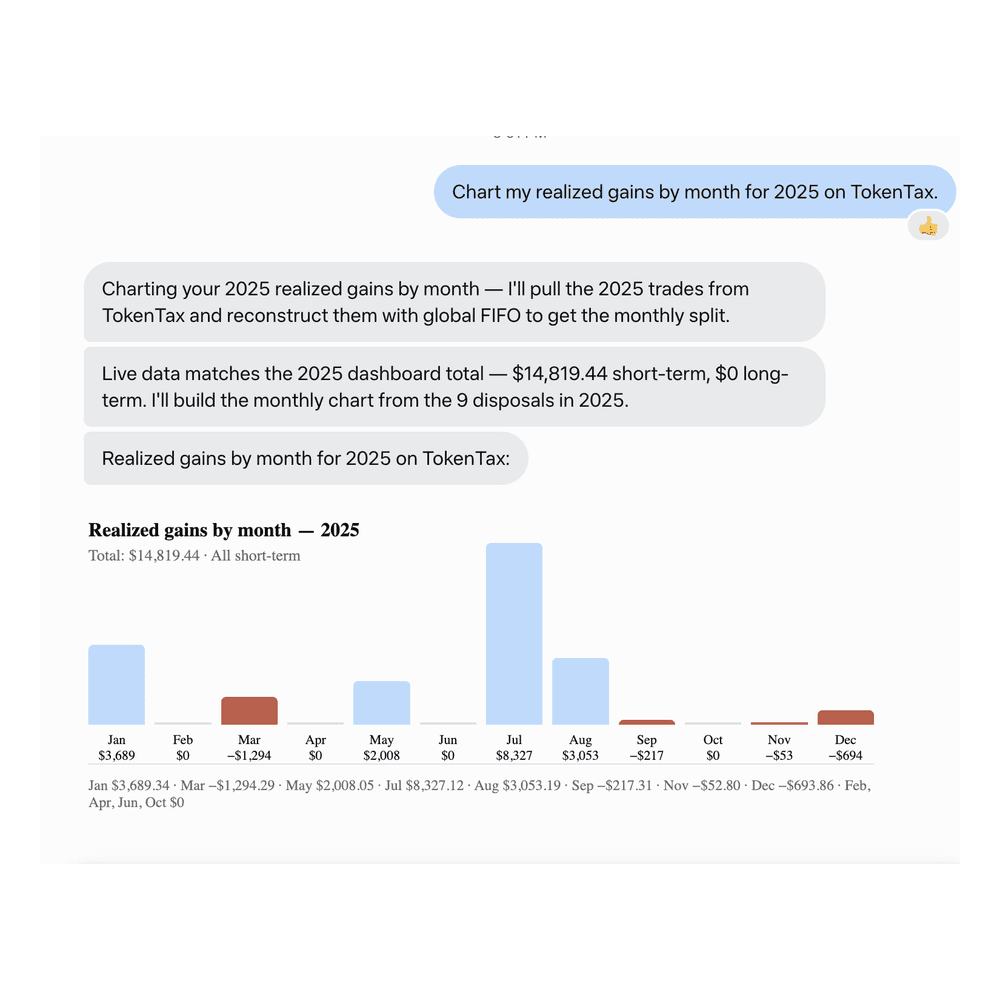
Chart realized gains by month. The 12 monthly figures added up to the 2025 total.
Compare an attached 1099-DA with TokenTax line by line. Muse found two mismatches. It also kept a sale missing cost basis in TokenTax separate from a sale that wasn’t on the form.
List holdings with unrealized losses for tax-loss harvesting. Under FIFO, Muse refused to make up a list and explained why. It built one only after we approved switching 2026 to Minimization and recalculating.
With your approval, Muse can also change your TokenTax data. In our test, it created a transaction, edited one, switched 2026 to Minimization, and started a recalculation. It can’t delete transactions, file your return, or produce your tax forms, which come from TokenTax reports.
What you need before you connect Muse to TokenTax
A paid TokenTax plan. MCP access is included with paid plans, and a plan for the current tax year lets you use every feature.
Your transaction history in TokenTax. Import your exchanges and wallets first, because Muse can only answer from what TokenTax holds. Missing imports show up as missing cost basis or missing sales, as they did in our tests.
A Muse account. The Free plan is enough. We used it to set up the connector and to ask every prompt in this guide.
Muse on the web for setup. Once TokenTax is connected, it also works in the Muse iOS app. We asked prompt 1 there in November 2026, and got the same 2026 figures.
How to connect TokenTax to Muse with a custom connector
In Muse, the TokenTax MCP server is added as a custom connector. In ChatGPT, Claude, and Grok, you paste the server URL into a form. Muse instead sets up the connector from a chat. You ask Muse to create it, approve it in Muse, approve sharing with TokenTax, and then sign in to TokenTax. If Muse asks what to connect to, give it this server URL:
https://api.app.tokentax.co/mcp
Ask Muse to create the connector. Start a new Muse chat and ask Muse to create a custom connector to TokenTax. Muse explains that TokenTax issues access through its own OAuth sign-in. Your TokenTax login stays with TokenTax; you don’t need an API key, and TokenTax supports automatic client registration for this flow.
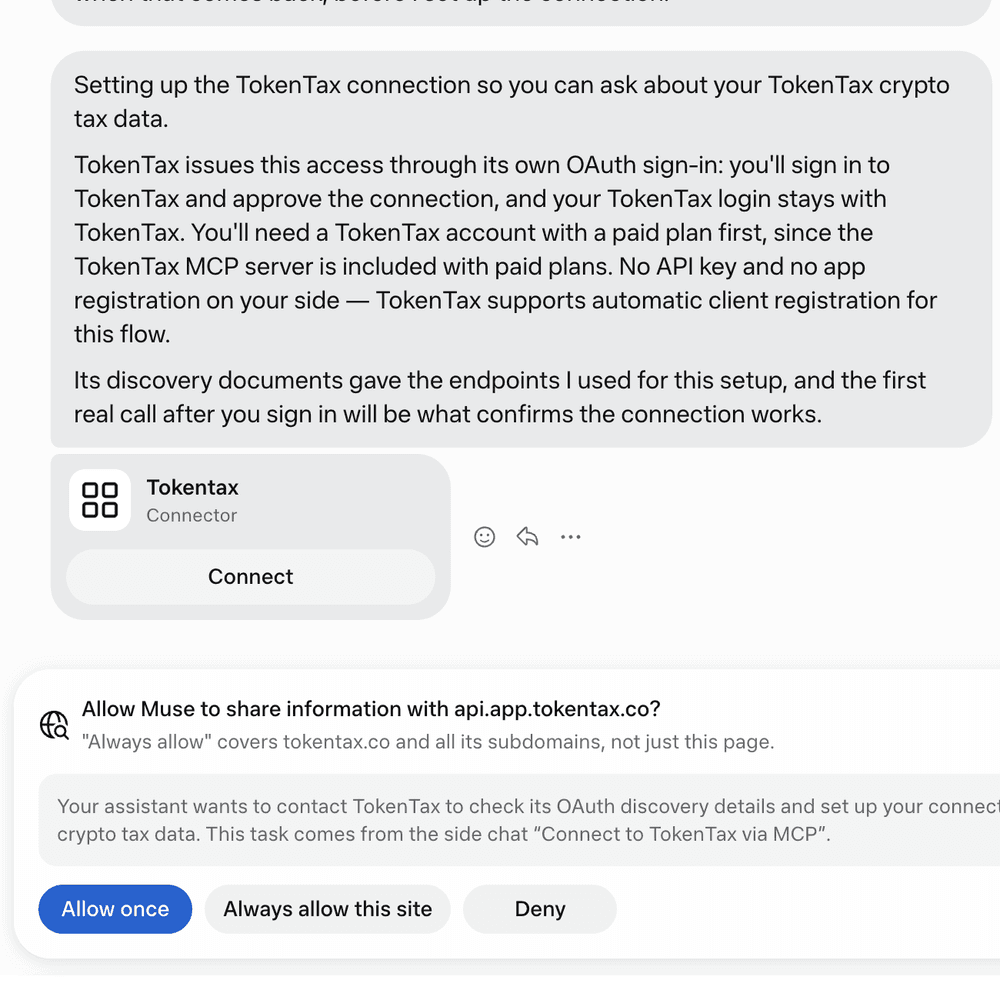
Click Connect on the connector card. Muse shows a Tokentax Connector card. Click Connect.
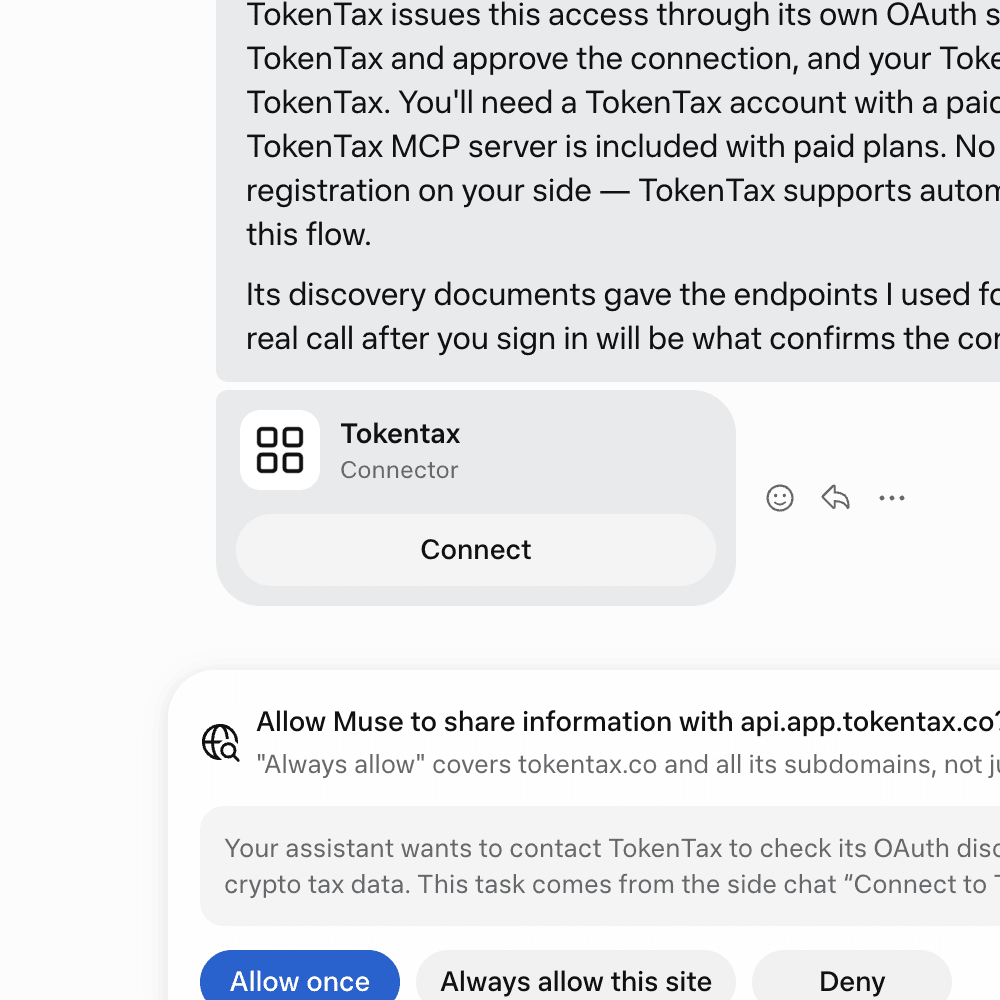
Approve the custom connector dialog. Muse opens a dialog headed Tokentax. It says Muse may exchange information with Tokentax and that you can disconnect any time in Settings. It also says Meta doesn’t review custom connectors or how they use your information. It tells you to grant access with caution and review their privacy policies. Click Connect.
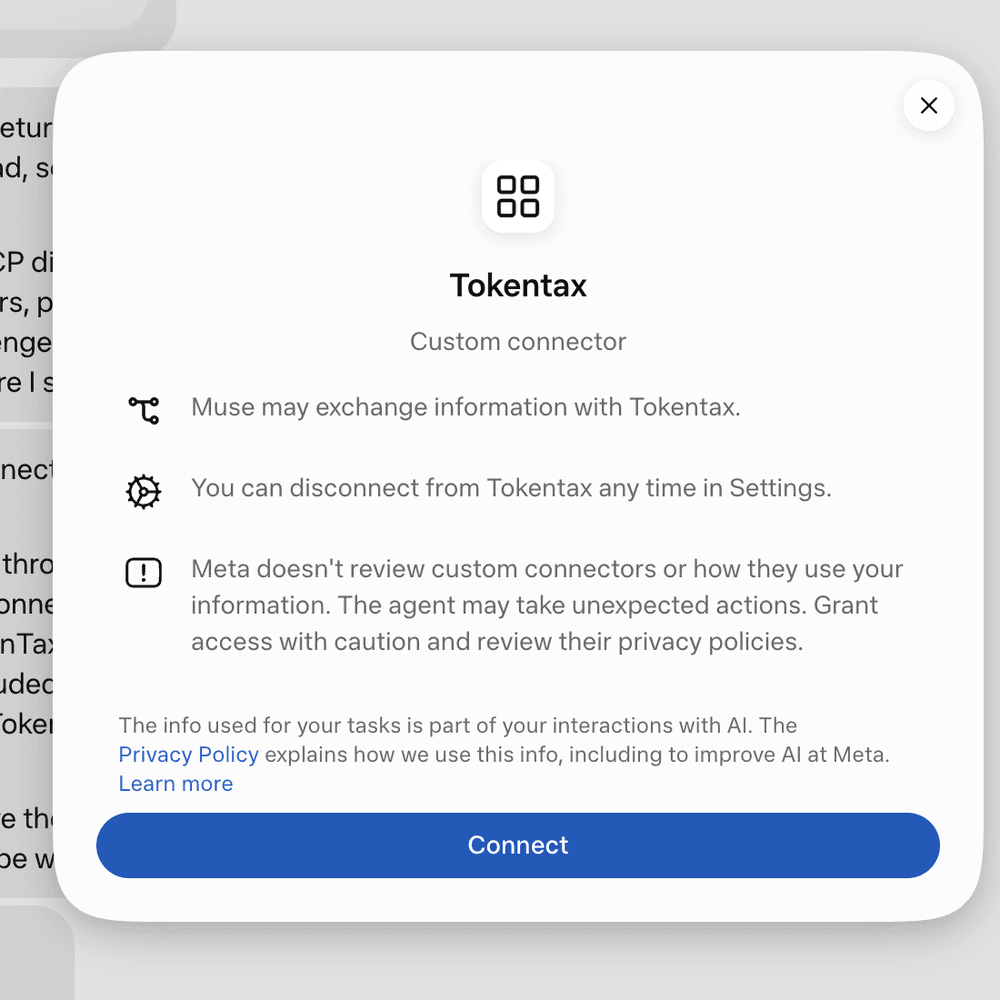
Allow sharing with TokenTax. Muse may ask, “Allow Muse to share information with api.app.tokentax.co?” Choose Allow once for a single check. Choose Always allow this site to skip this prompt on later checks, or Deny to stop. Always allow covers tokentax.co and all its subdomains, not just one page. We used Allow once for every test in this guide.
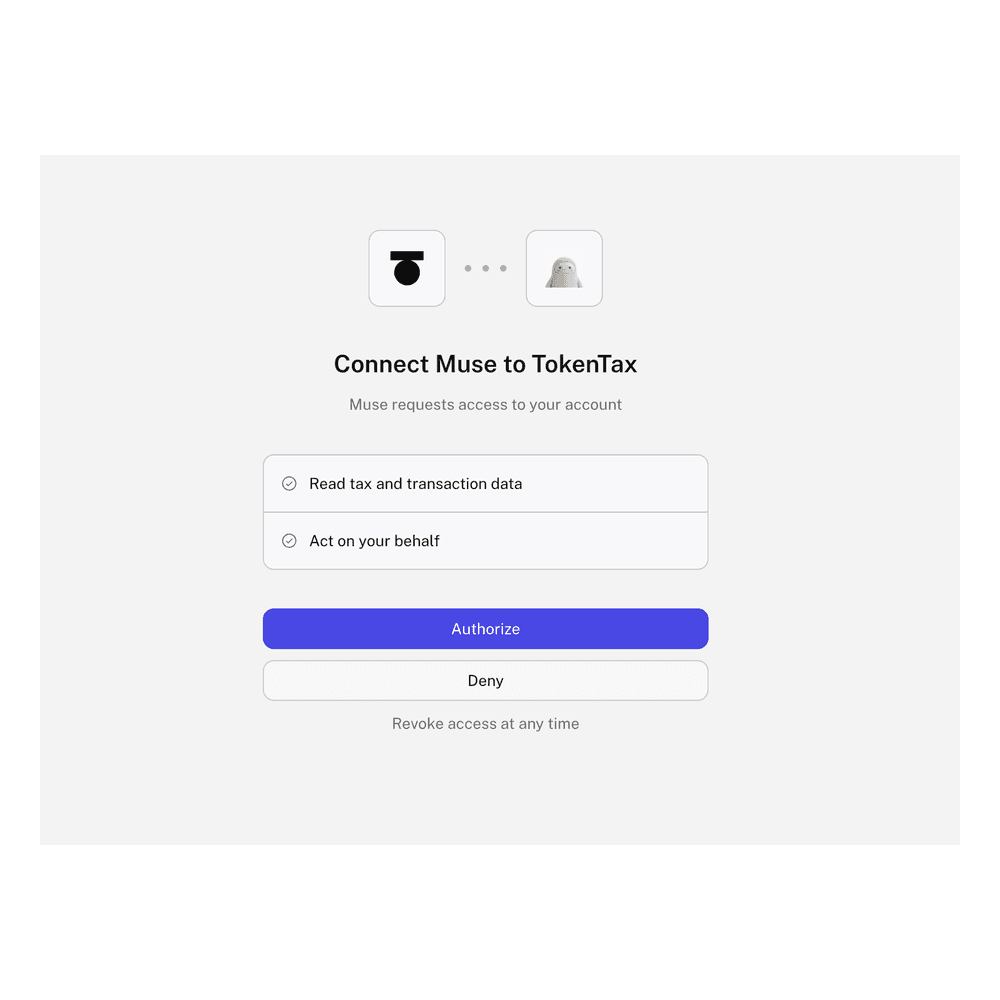
Authorize Muse in TokenTax. Sign in to TokenTax if prompted. On the page headed “Connect Muse to TokenTax”, check both permissions, “Read tax and transaction data” and “Act on your behalf”, then click Authorize. Click Deny instead to stop. The page notes that you can revoke access at any time.
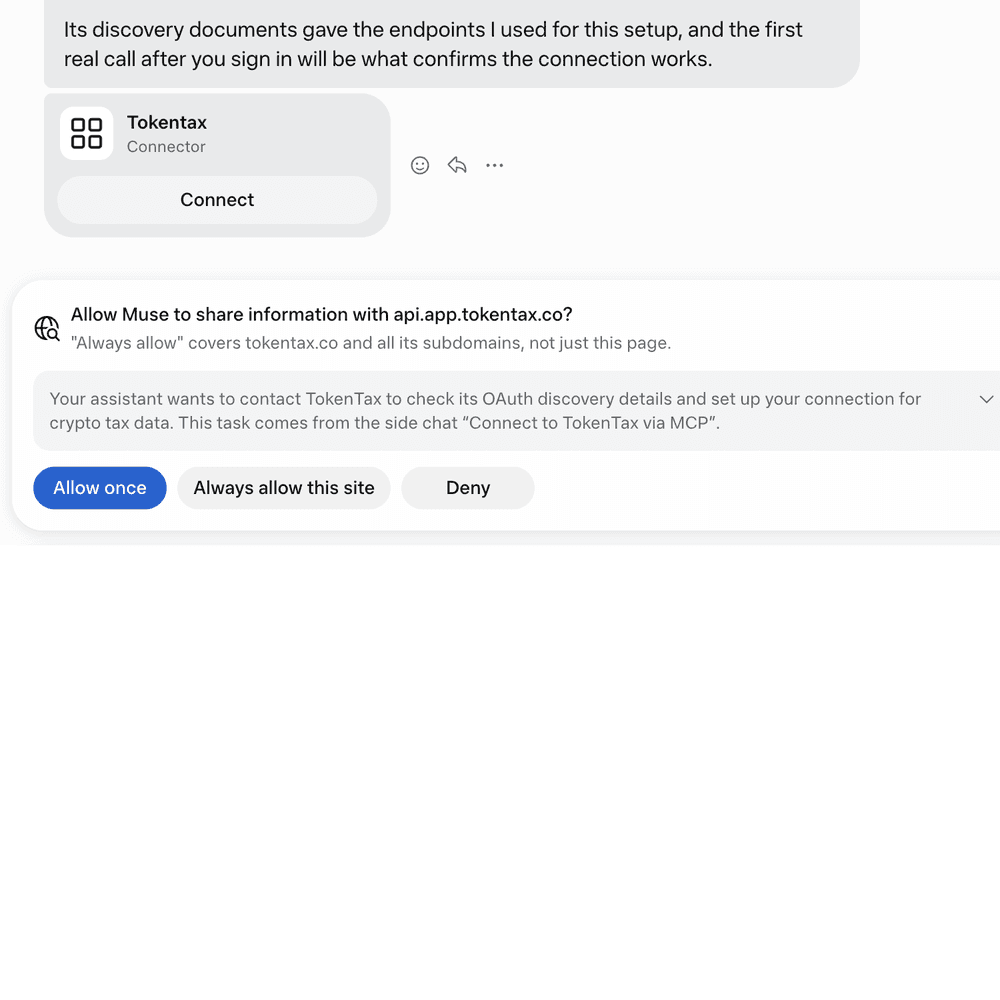
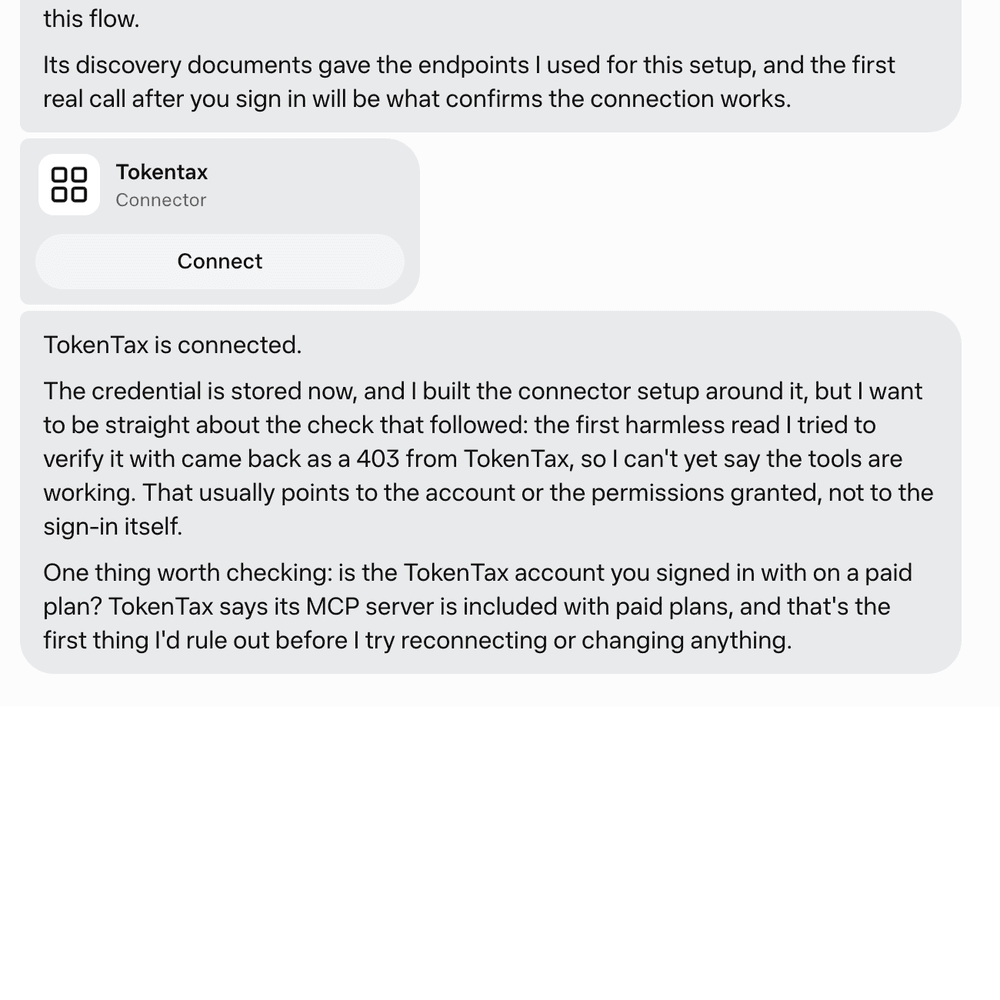
Confirm the connection with a real question. Muse may report that TokenTax is connected, but that message alone doesn’t prove the connection works. In our test, Muse reported it and then failed its first tool check (see troubleshooting below). Start a new chat and ask a question that needs your TokenTax data, such as prompt 1 below. Approve the tool request. An answer with a figure from TokenTax confirms the connection.
Example prompts to try in Muse
We ran these prompts in November 2026 in Muse on the web. The TokenTax test account had 28 transactions across Coinbase Test Account, Kraken Test Account, and Phantom Test Account. We sent each prompt in a new chat, approved each tool request with the one-time option, and checked every answer against TokenTax. Prompts 1 to 3 and 8 used FIFO.
Keep “on TokenTax” in the wording where a prompt includes it. For prompts 5 and 6, attach your 1099-DA to the chat first. TokenTax’s tools read your TokenTax data, not your tax forms, so Muse needs the form to compare against. Our results came from a sample form. Both prompts are a starting point for 1099-DA reconciliation.
“What are my short-term and long-term capital gains so far in 2026 on TokenTax?” Muse returned short-term gains of -$678.93 and long-term gains of $4,283.35 for 2026.

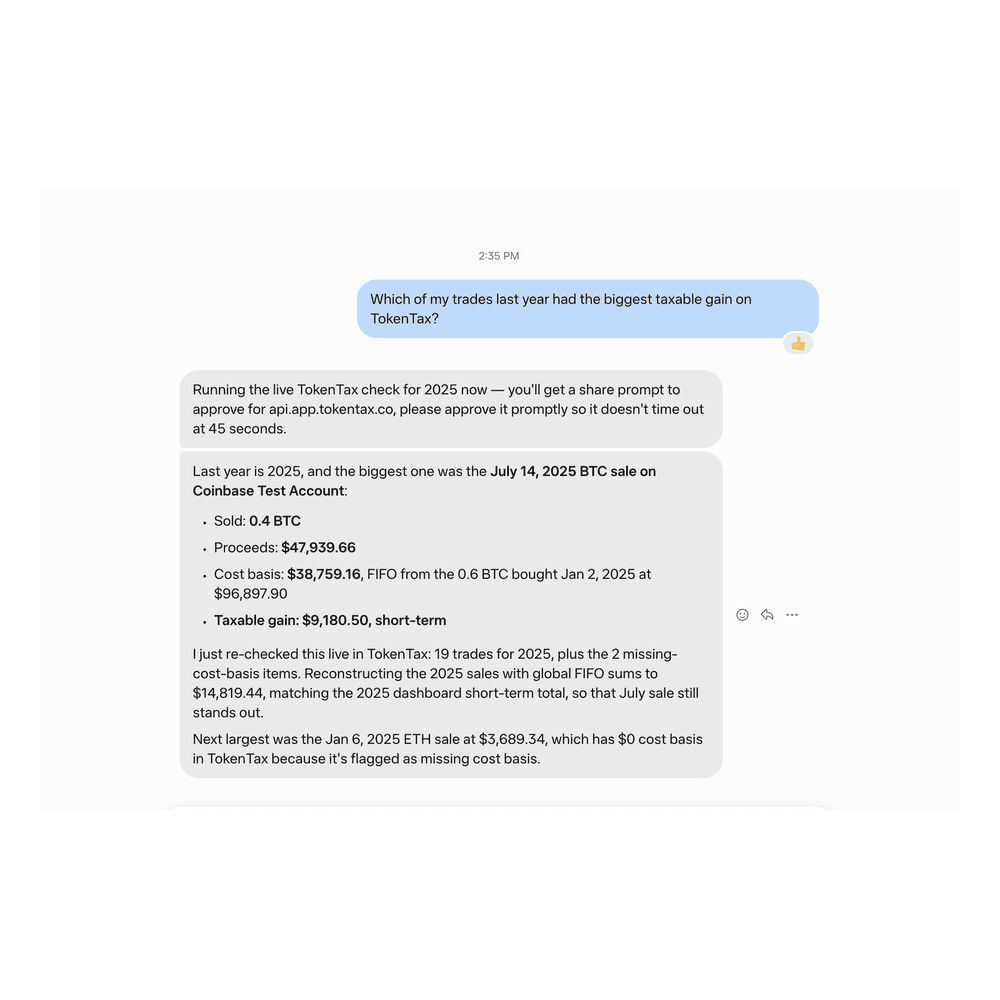
“Which of my trades last year had the biggest taxable gain on TokenTax?” Muse picked the July 14, 2025 Coinbase sale of 0.4 BTC: proceeds of $47,939.66, cost basis of $38,759.16, and a short-term gain of $9,180.50.
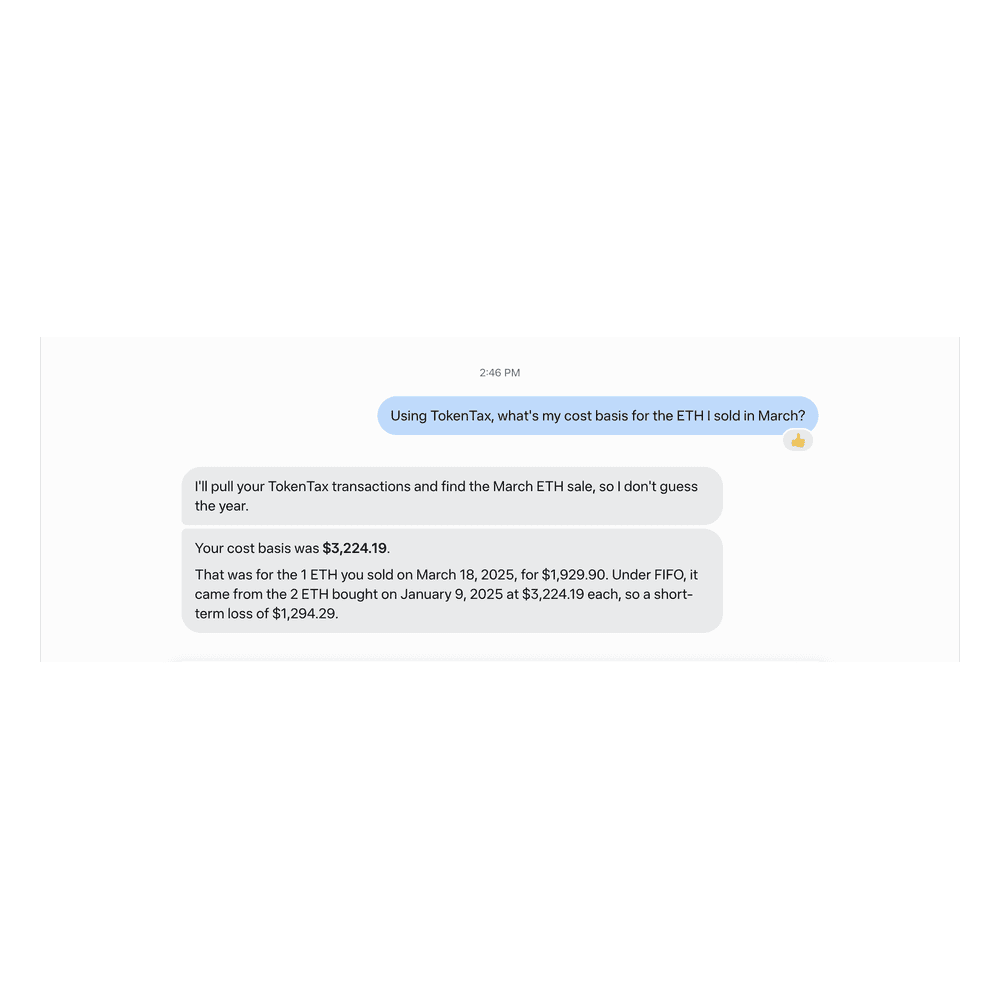
“Using TokenTax, what’s my cost basis for the ETH I sold in March?” Muse gave a cost basis of $3,224.19 for the 1 ETH sold March 18, 2025, a short-term loss of $1,294.29.
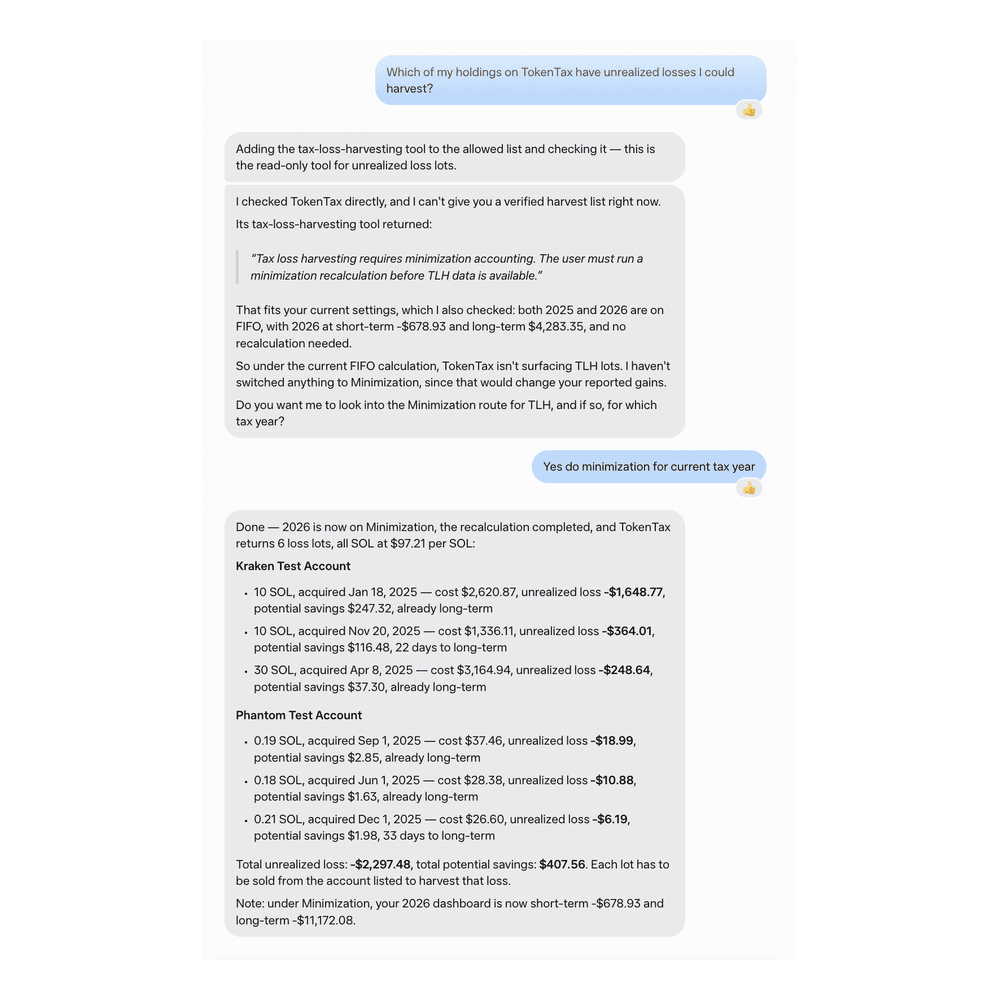
“Which of my holdings on TokenTax have unrealized losses I could harvest?” After we approved switching 2026 to Minimization, Muse listed 6 SOL loss lots totaling -$2,297.48, with $407.56 in potential savings.
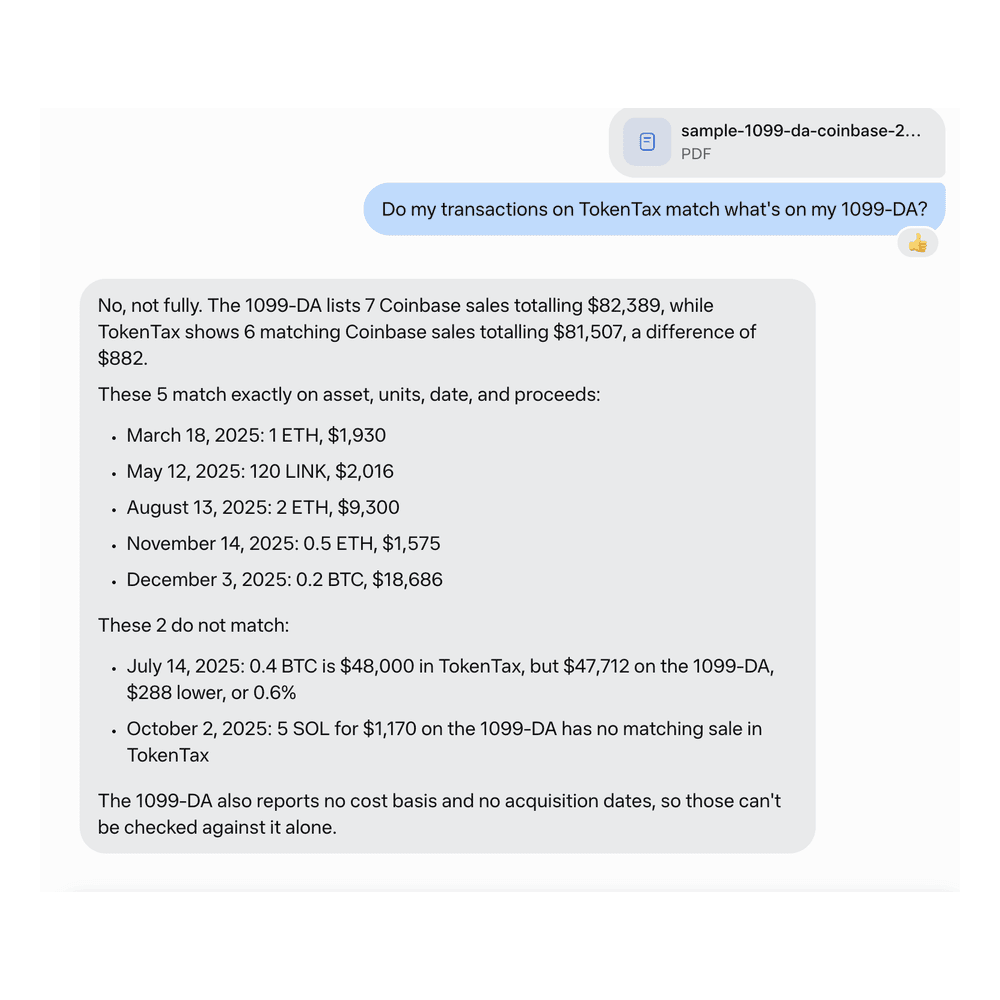
“Do my transactions on TokenTax match what’s on my 1099-DA?” Not a full match. Muse found 5 exact matches and a $288 proceeds gap on the July 14 BTC sale. It also found an October 2 SOL sale missing from TokenTax, for a total gap of $882.
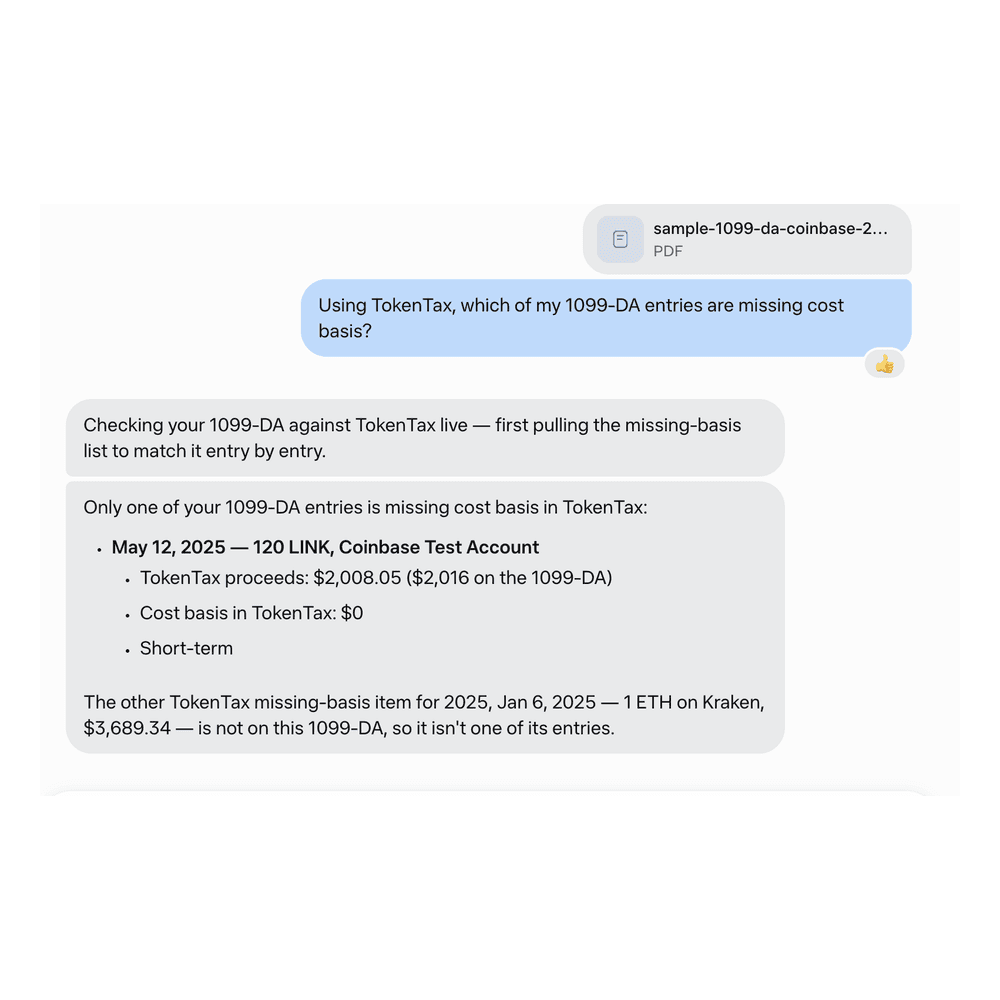
“Using TokenTax, which of my 1099-DA entries are missing cost basis?” Muse named one: the May 12, 2025 sale of 120 LINK.
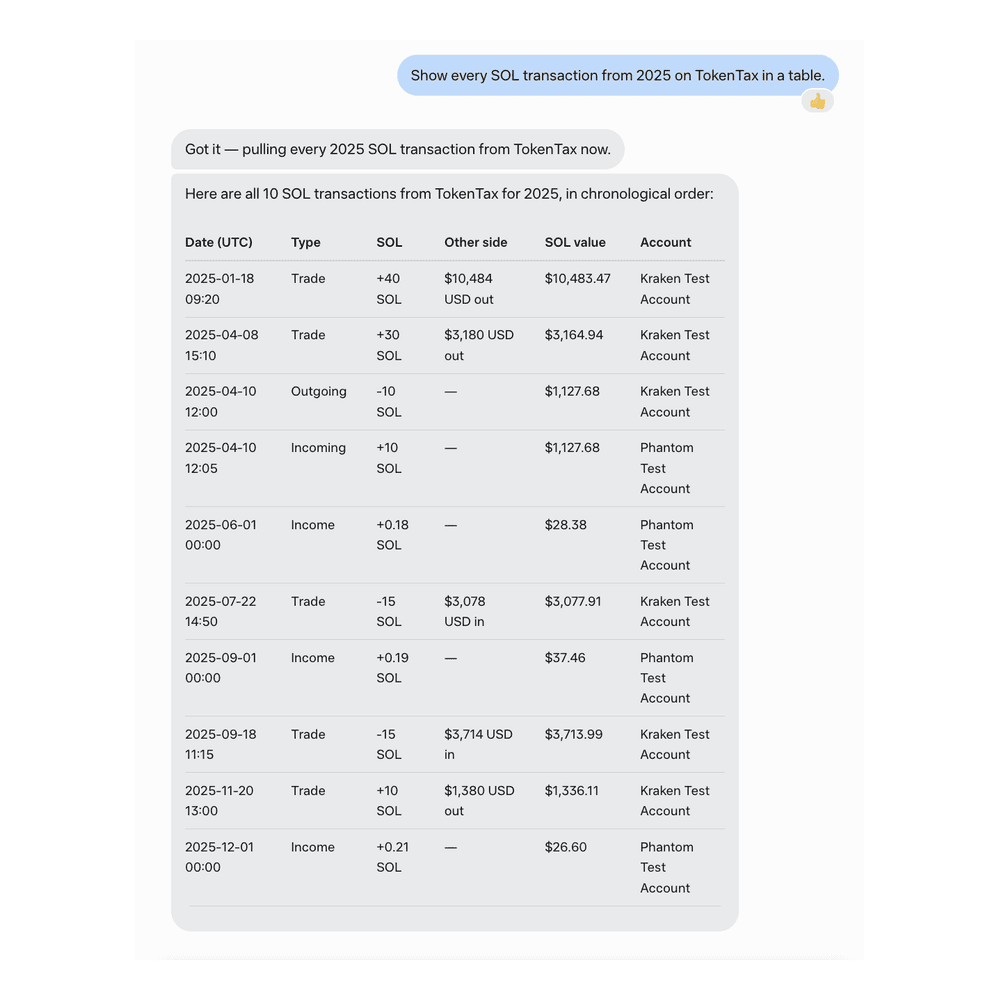
“Show every SOL transaction from 2025 on TokenTax in a table.” Muse built a 10-row table of 2025 SOL transactions.
“Chart my realized gains by month for 2025 on TokenTax.” Muse charted monthly gains totaling $14,819.44, all short-term.
Is it safe to connect TokenTax to Muse?
Yes, if you use the same caution Muse asks for with any custom connector. Sign-in runs through OAuth on TokenTax’s own page. You never paste an API key into Muse, and you never type your TokenTax password into it.
When you authorize the connection, TokenTax asks for two permissions: “Read tax and transaction data” and “Act on your behalf.” The second one lets Muse change your data. In November 2026, the tool list for this connection returned 16 tools.
Eleven are read-only. Five can change data: Start Recalculation, Update Tax Info, Edit Transaction, Create Transactions, and Merge Transactions. TokenTax doesn’t ask for its own confirmation before a change, so approving the request in Muse is the only check. For prompt 4, Muse used two of those tools, with our approval, to switch 2026 to Minimization and recalculate.
To disconnect, open Settings → Connectors in Muse and disconnect TokenTax. Muse stops exchanging data with TokenTax. However, information it has already used may remain in its memory and conversation history. You can ask Muse to forget those interactions. See Muse’s privacy policy.
You can also remove Muse’s access from TokenTax. Open Profile, find Muse under MCP Integrations, and click Remove.
Troubleshooting TokenTax in Muse
I can’t find the custom connector option in Muse
Look in a chat, not in Settings. Ask Muse in a new chat to create a custom connector to TokenTax, then look for the TokenTax Connector card.
Muse asks me to paste an API key
Don’t paste one. TokenTax doesn’t use API keys for this connection. Sign-in is OAuth on TokenTax with automatic client registration, so if Muse asks for a key, the connector wasn’t built for that flow. Disconnect it under Settings → Connectors. Then ask Muse in a new chat to create the TokenTax custom connector again.
I connected but see a paid-plan message
The TokenTax MCP server works only with paid TokenTax plans. Check that the TokenTax account you signed in with is on a paid plan, and upgrade if you need to. Your Muse plan isn’t the cause, since we connected on Muse’s Free plan.
Muse’s share prompt times out or is declined
The share prompt times out if you don’t approve it within about 45 seconds. If you decline it, the check stops before Muse asks TokenTax for anything. Neither result tells you anything about TokenTax. Ask again and click Allow once when the prompt comes back.
Muse won’t list tax-loss harvesting lots under FIFO
That’s expected. TokenTax builds harvesting lists from its Minimization calculation, so a Minimization recalculation has to run first. Muse asked which tax year to change before it changed anything. The switch changes your realized gains for that year. In our test, 2026 long-term gains went from 4,283.35 under FIFO to -11,172.08 under Minimization. If you file using FIFO, switch back and recalculate afterward.
Muse TokenTax MCP server FAQs
Can Muse do my crypto taxes?
Do I need a TokenTax API key to use Muse?
Does Muse need a paid plan to connect TokenTax?
Can Muse change or delete my TokenTax data?
Will Muse’s answers match my TokenTax reports?
What other AI apps work with TokenTax?
To stay up to date on the latest, follow TokenTax on Twitter @tokentax.
