How to Use TokenTax with Claude

 Expert verified
TokenTax content follows strict guidelines for editorial accuracy and integrity. We do not accept money from third party sites, so we can give you the most unbiased and accurate information possible.

Why trust our crypto tax experts
This guide covers how to use TokenTax with Claude so you can ask questions about your crypto tax data in plain language. The TokenTax MCP server connects Claude to your TokenTax account, and Claude answers from your imported transactions, gains, and tax reports. You need a paid TokenTax plan and a Claude account on any plan, including Free. TokenTax also works with ChatGPT, Grok, Muse, Codex, Claude Code, and VS Code.
What you can do with TokenTax in Claude
With the TokenTax Claude connector turned on, Claude answers from your own account instead of from general tax rules. In our testing, Claude could:
Show your short-term and long-term capital gains for a tax year. Its totals matched the TokenTax report to the dollar.
List every SOL transaction in a tax year in a table, with the date, type, account, amount, and USD value for each.
Rank your 10 largest transactions for the year in a table, with the date, amount, and account for each.
Find the date an ETH balance went negative and the sale that caused it, so you know which purchase or transfer is missing from your imports.
List sales that are missing cost basis, with the sale date, coin, amount, account, and proceeds, plus a link to each sale in TokenTax.
Claude can also add and edit transactions, change a tax year's cost basis method or capital gains tax rates, and start a recalculation, each with your approval. In our tests, it added a missing purchase and a missing trading fee, and TokenTax's totals changed by the expected amounts after a recalculation.
What you need before you connect Claude to TokenTax
A paid TokenTax plan for the current tax year. MCP access is included with paid plans, and a current-year plan lets you use every feature.
Your transaction history in TokenTax. Import your exchanges and wallets first so Claude has complete data to work from.
A Claude account on any plan. Free accounts can have only one custom connector, so remove any existing custom connector first.
Claude on the web or Claude Desktop for setup. Once TokenTax is connected, it's also available in the Claude apps for iOS and Android.
On a Team or Enterprise plan, an organization Owner adds TokenTax before members can connect it. Those steps are below.
How to connect TokenTax to Claude with a custom connector
Claude calls a remote MCP server a custom connector. To connect your crypto tax data, you add the TokenTax MCP server as a custom connector, then sign in to TokenTax to approve access. Here's the server URL to copy:
https://api.app.tokentax.co/mcp
These steps follow Claude's official setup docs. They're the same in Claude on the web and in Claude Desktop, because connectors are tied to your Claude account rather than your device.
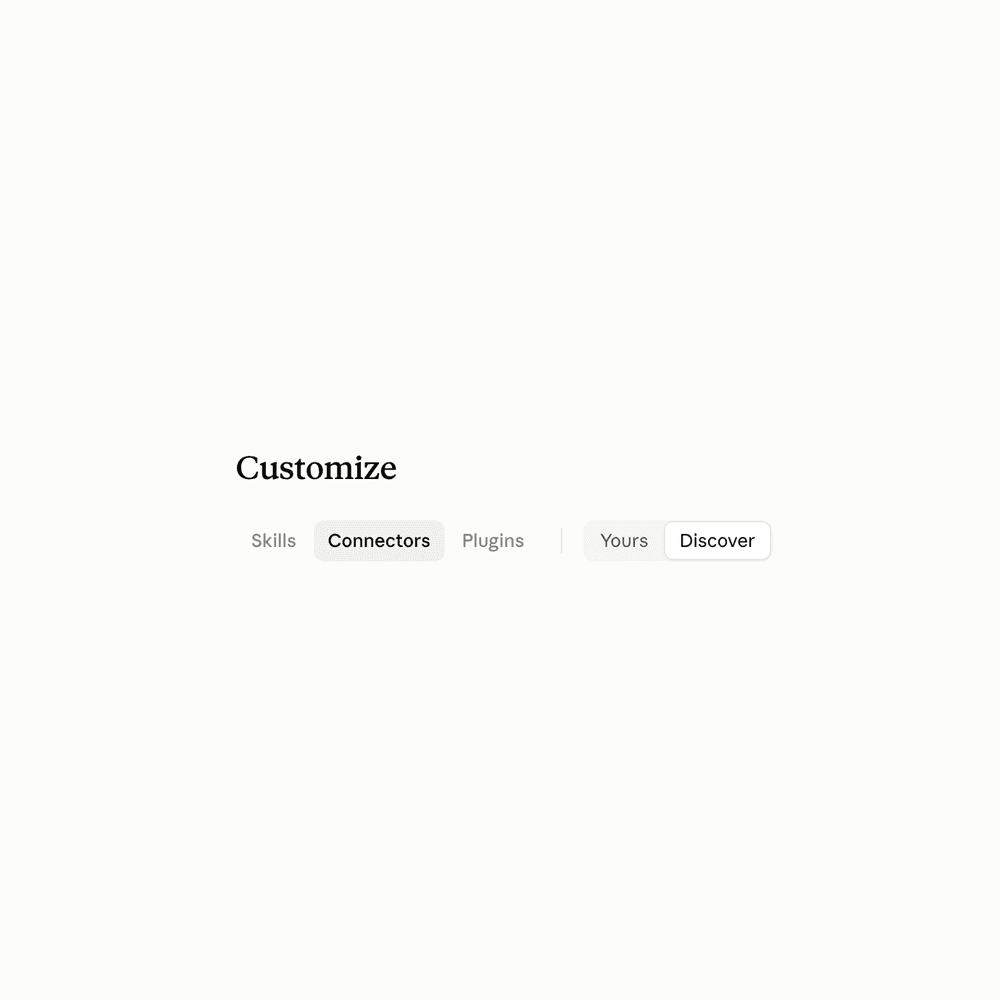
Open Connectors. In Claude, go to Customize → Connectors.
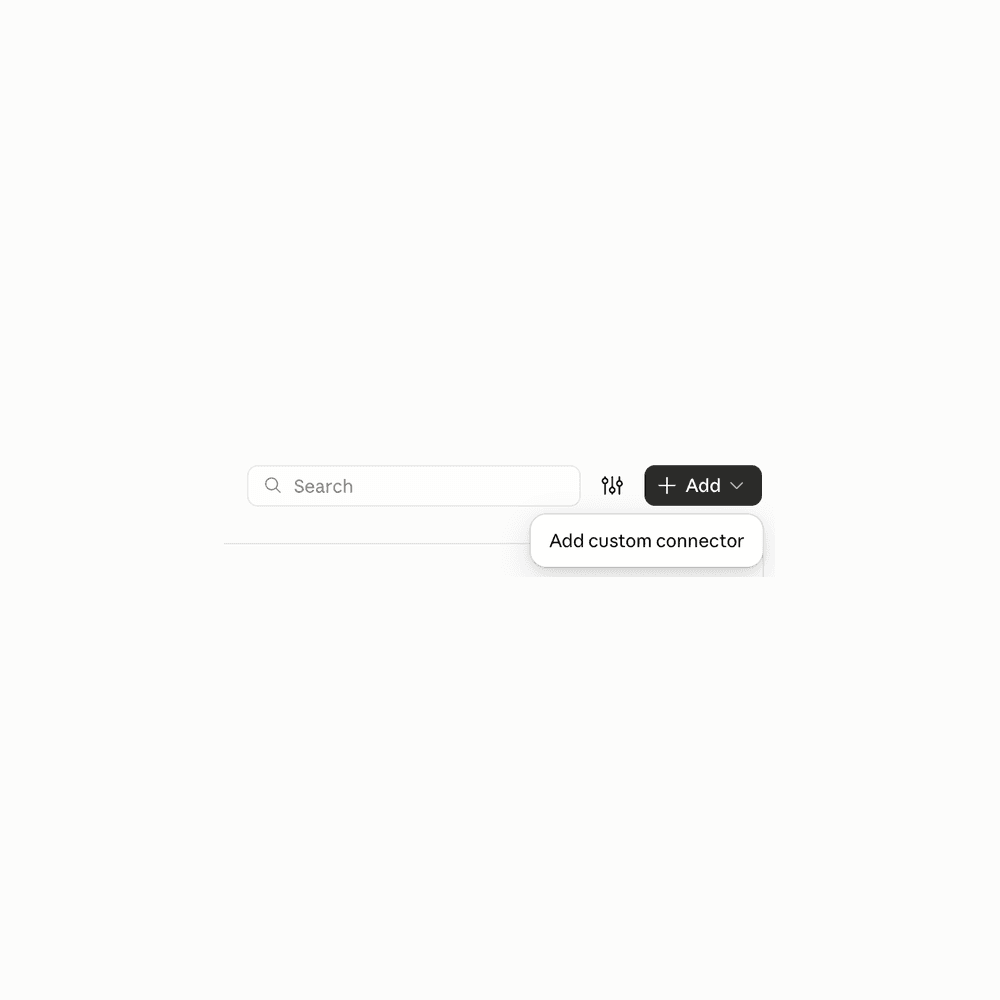
Add a custom connector. Click + Add, then Add custom connector.
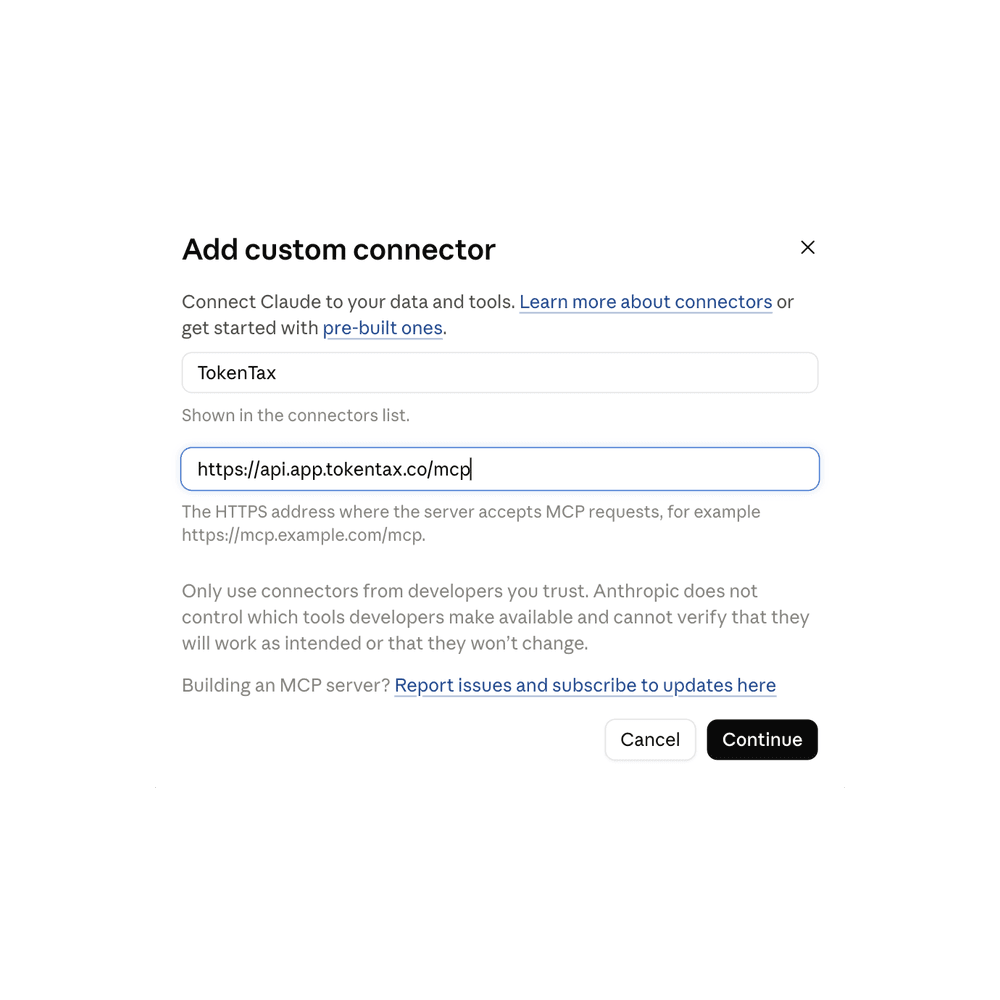
Enter the name and URL. Type TokenTax in the Name field, paste the server URL in the MCP server URL field, and click Continue.
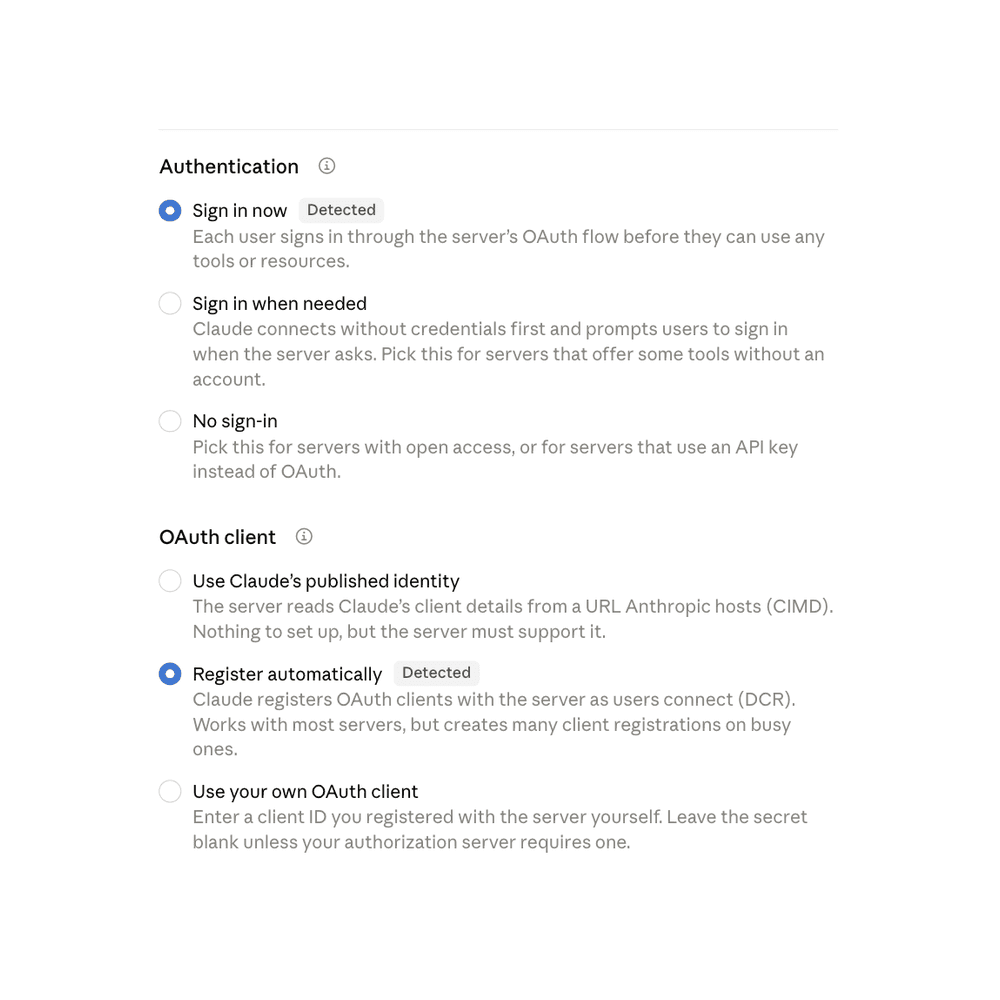
Keep the detected settings and click Add. Claude checks the TokenTax server and marks the settings it needs as Detected: Sign in now under Authentication and Register automatically under OAuth client. Leave Request headers and Advanced as they are, since TokenTax doesn't use an API key. Scroll to the bottom of the window and click Add, not + Add header.
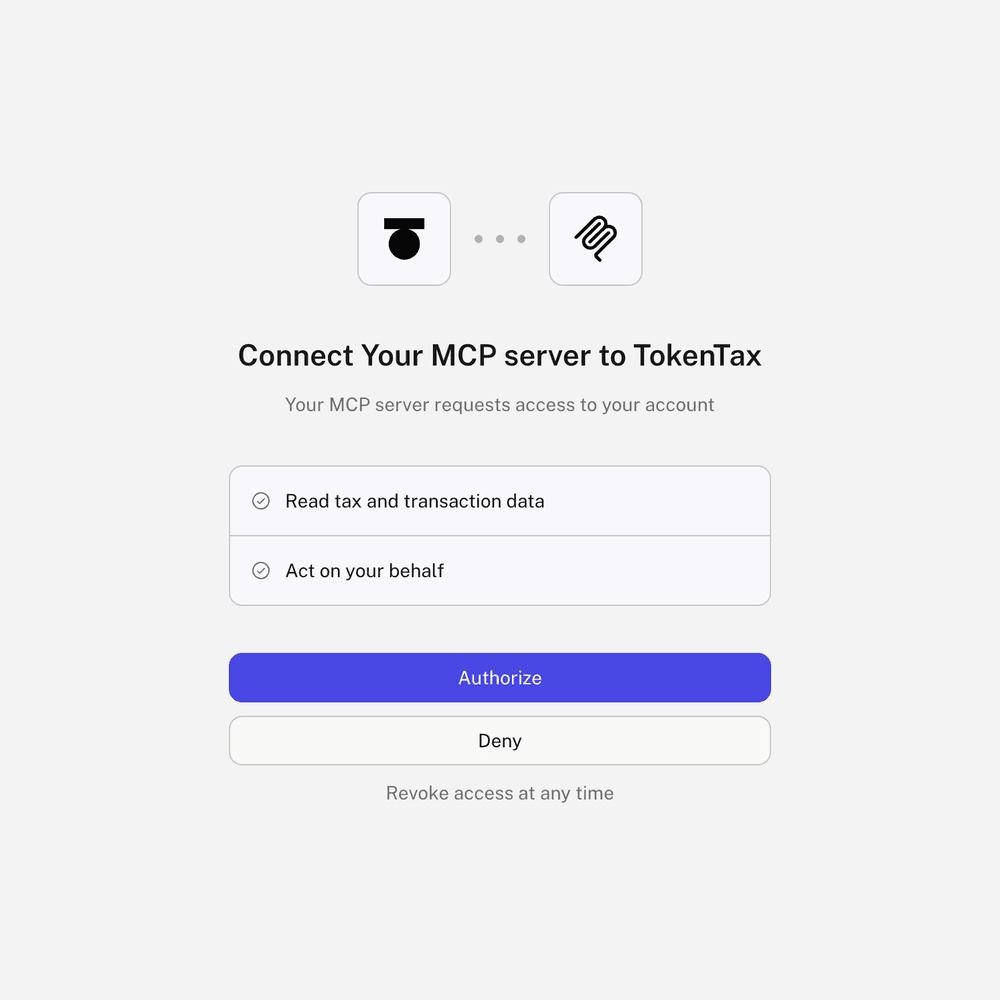
Authorize Claude in TokenTax. After you click Add, Claude opens TokenTax in your browser. Log in if you aren't already. TokenTax refers to Claude as "your MCP server" and asks for two permissions: Read tax and transaction data and Act on your behalf. Click Authorize. Claude returns you to TokenTax's connector page, where a Disconnect button confirms TokenTax is connected. If TokenTax doesn't open, go to Customize → Connectors, select TokenTax, and click Connect.
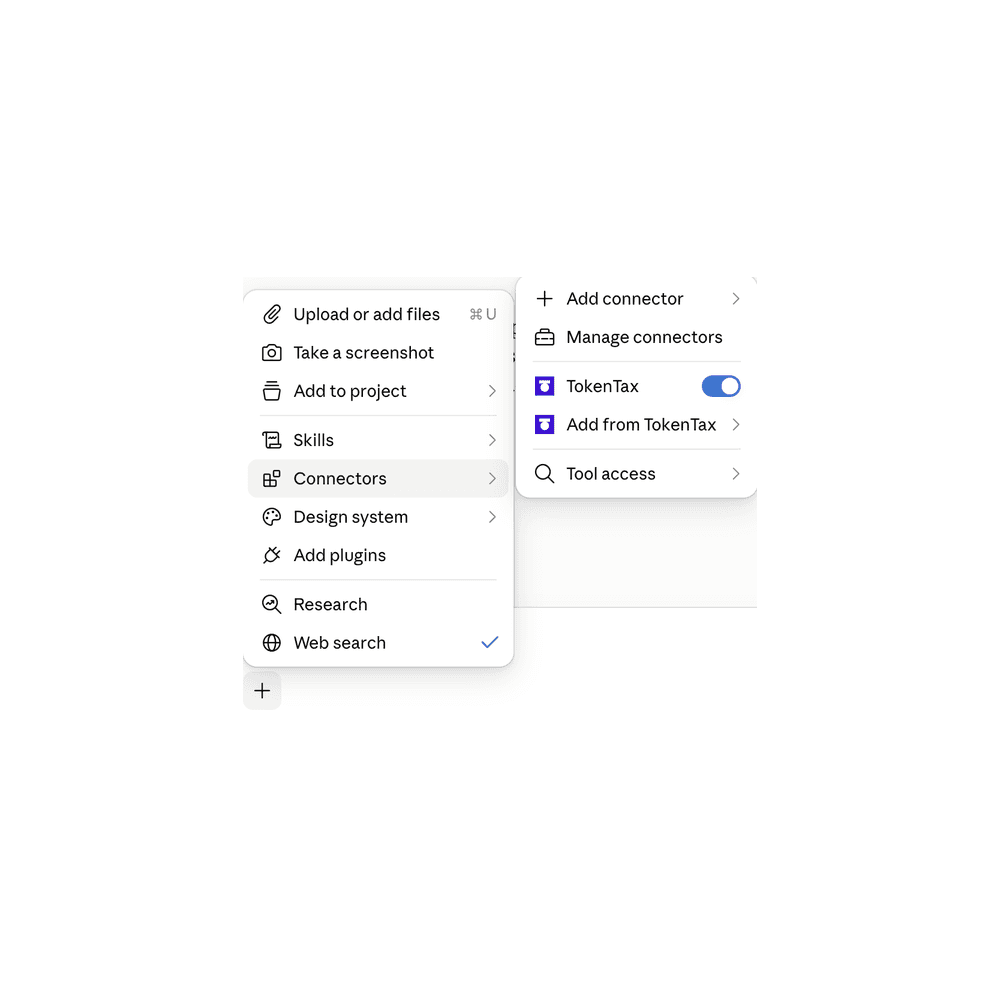
Make sure TokenTax is on in your chat. In a conversation, click + in the lower left of the message box, hover over Connectors, and check that TokenTax is switched on. Claude uses TokenTax when your question calls for your tax data. Adding "on TokenTax" to a prompt, as in the examples below, makes that explicit.
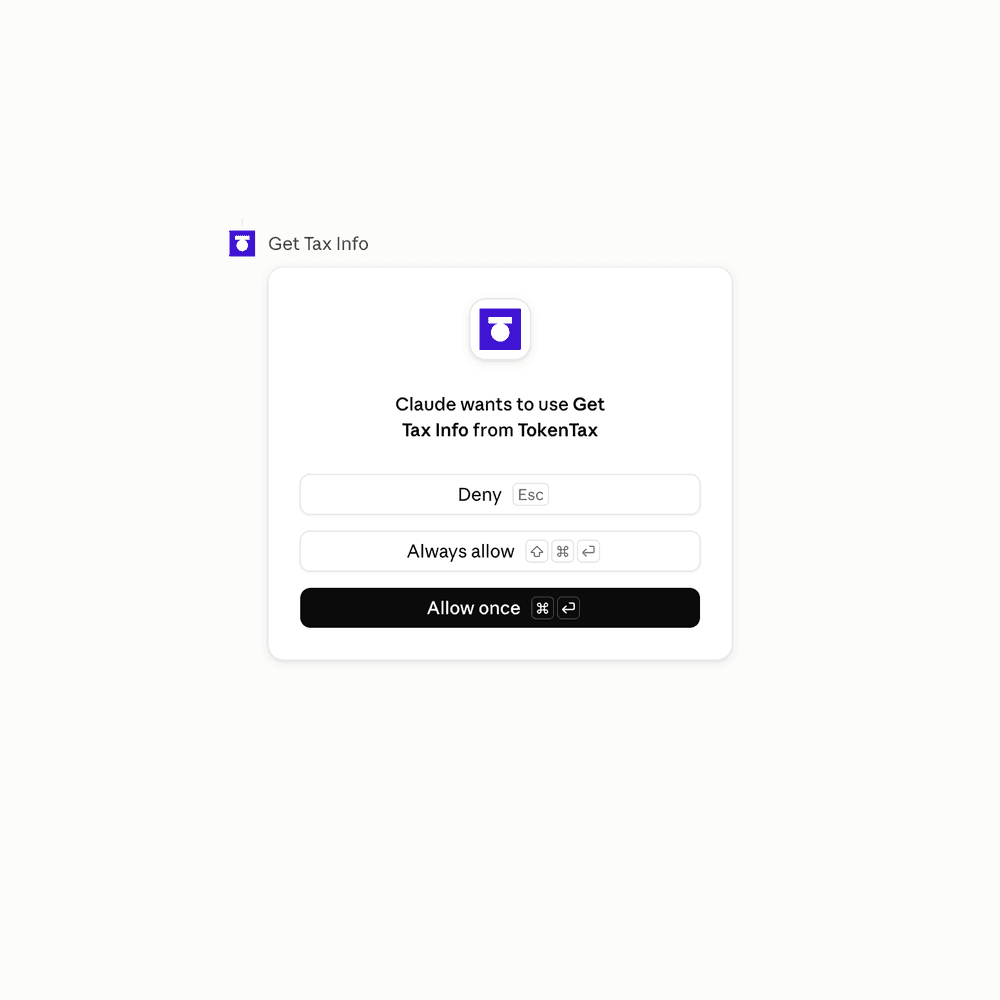
By default, Claude asks before it uses any TokenTax tool, including tools that only read your data. The prompt names the tool, such as Get Tax Info, and gives you three choices: Allow once approves that one request, Always allow lets the tool run without asking again, and Deny blocks it.
If you're on a Claude Team or Enterprise plan, an Owner adds TokenTax once for the whole organization. In Organization settings → Connectors, the Owner clicks Add, hovers over Custom, selects Web, and enters the same name and URL. Each member then opens Customize → Connectors, finds TokenTax with a Custom label, and clicks Connect to sign in with their own TokenTax account.
Example prompts to try in Claude
We ran these prompts in October, 2026, in Claude Pro on the web, using a TokenTax test account with 28 transactions across two exchanges and one wallet. We sent each prompt in a new chat and checked every answer against TokenTax's reports.
"What are my short-term and long-term capital gains so far in 2026 on TokenTax?"
"Which of my trades last year had the biggest taxable gain on TokenTax?"
"Using TokenTax, what's my cost basis for the ETH I sold in March?"
"Which of my holdings on TokenTax have unrealized losses I could harvest?"
"Do my transactions on TokenTax match what's on my 1099-DA?"
"Using TokenTax, which of my 1099-DA entries are missing cost basis?"
"Show every SOL transaction from 2025 on TokenTax in a table."
"Chart my realized gains by month for 2025 on TokenTax."
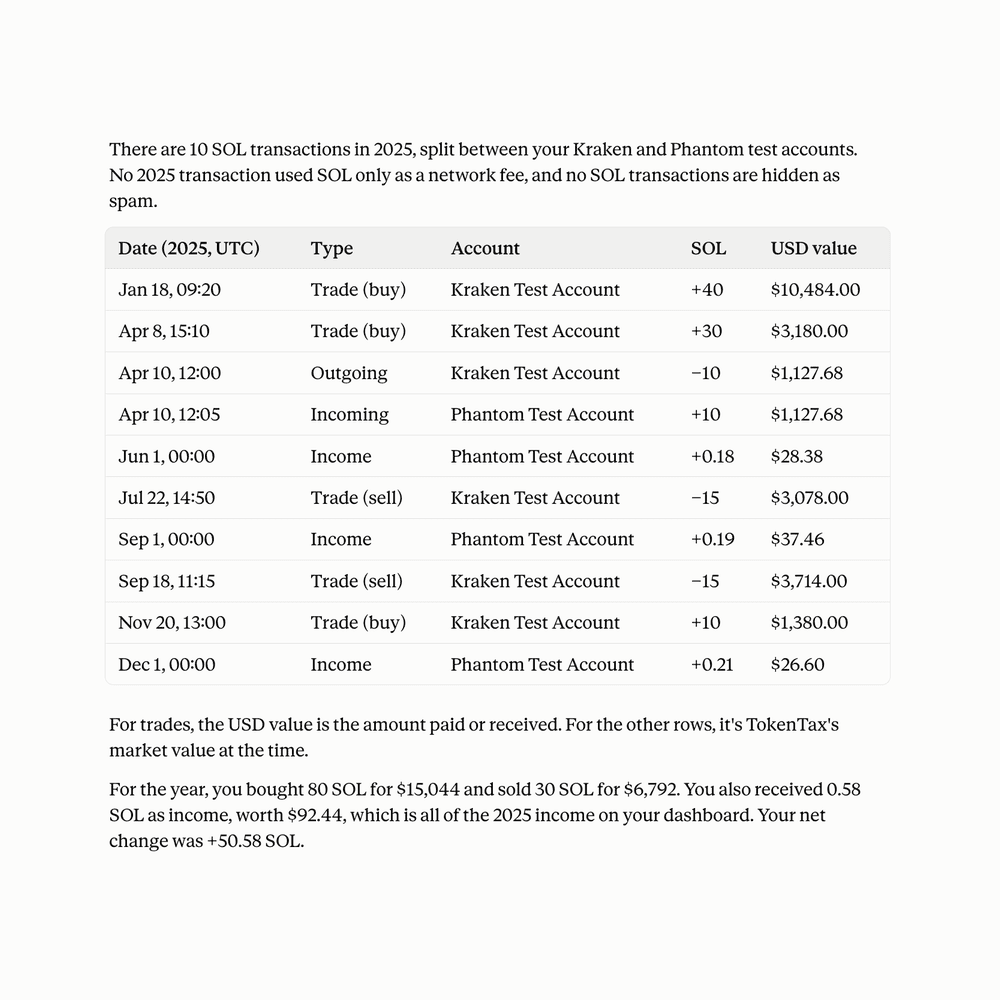
For questions about a single trade or month, Claude works out the gains from your transactions using your cost basis method, since TokenTax reports totals for each year rather than for each sale. In our tests, Claude's per-trade figures and its monthly chart both added up exactly to TokenTax's 2025 total. Claude answered in tables where a list made sense, and the monthly prompt returned a bar chart.
Claude's list of tax-loss harvesting lots comes from TokenTax's Minimization calculation, because harvesting means choosing which lots to sell. If your tax year uses FIFO or LIFO, Claude will offer to switch the year to Minimization and recalculate before it answers. That switch changes your realized gains for the year, so switch back afterward if you file using FIFO. In our test, Claude asked before switching and switched back when we asked.
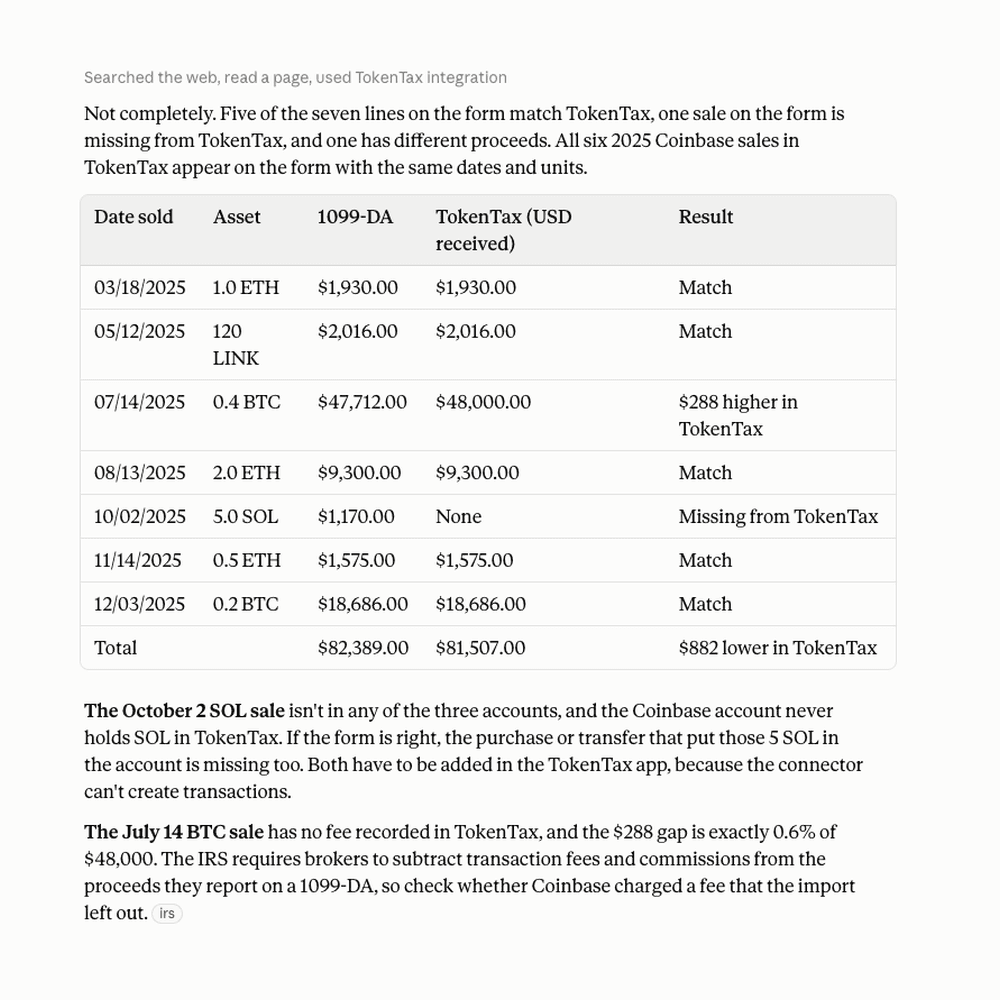
For the two 1099-DA prompts, attach your 1099-DA to the chat first. TokenTax's tools read your TokenTax data, not your tax forms, so Claude needs the form to compare against. Forms 1099-DA for 2025 report gross proceeds but not cost basis, so expect every line to show a blank basis. Claude checks which of those sales TokenTax can fill in from your data. In our test with a sample form, Claude matched five of seven lines, flagged a sale missing from TokenTax and a $288 proceeds gap that matched a 0.6% trading fee, and named the one sale TokenTax had no cost basis for. When we asked, Claude added the missing fee to that sale, and after a recalculation the year's short-term gains dropped by exactly $288. These prompts are a starting point for 1099-DA reconciliation.
If Claude finds a sale with missing cost basis, TokenTax couldn't match that sale to a purchase, so it treats the sale as having a $0 cost basis and counts the full proceeds as gain. This usually happens when you bought the coins on an exchange or wallet you haven't imported. In our tests, Claude included a link to each sale that opens your All Transactions page in TokenTax, filtered to that transaction. From there, import the missing account or click Create New to add the purchase, then recalculate. If you know when you bought the coins and what you paid, you can also ask Claude to add the purchase. In our test, Claude added a missing LINK purchase, and after a recalculation TokenTax applied its cost basis to the sale.
Is it safe to connect TokenTax to Claude?
The connection uses OAuth. You sign in on TokenTax's own page, so Claude never sees your TokenTax password, and every request runs as the account you signed in with. Anthropic stores the access token encrypted and deletes it when you disconnect.
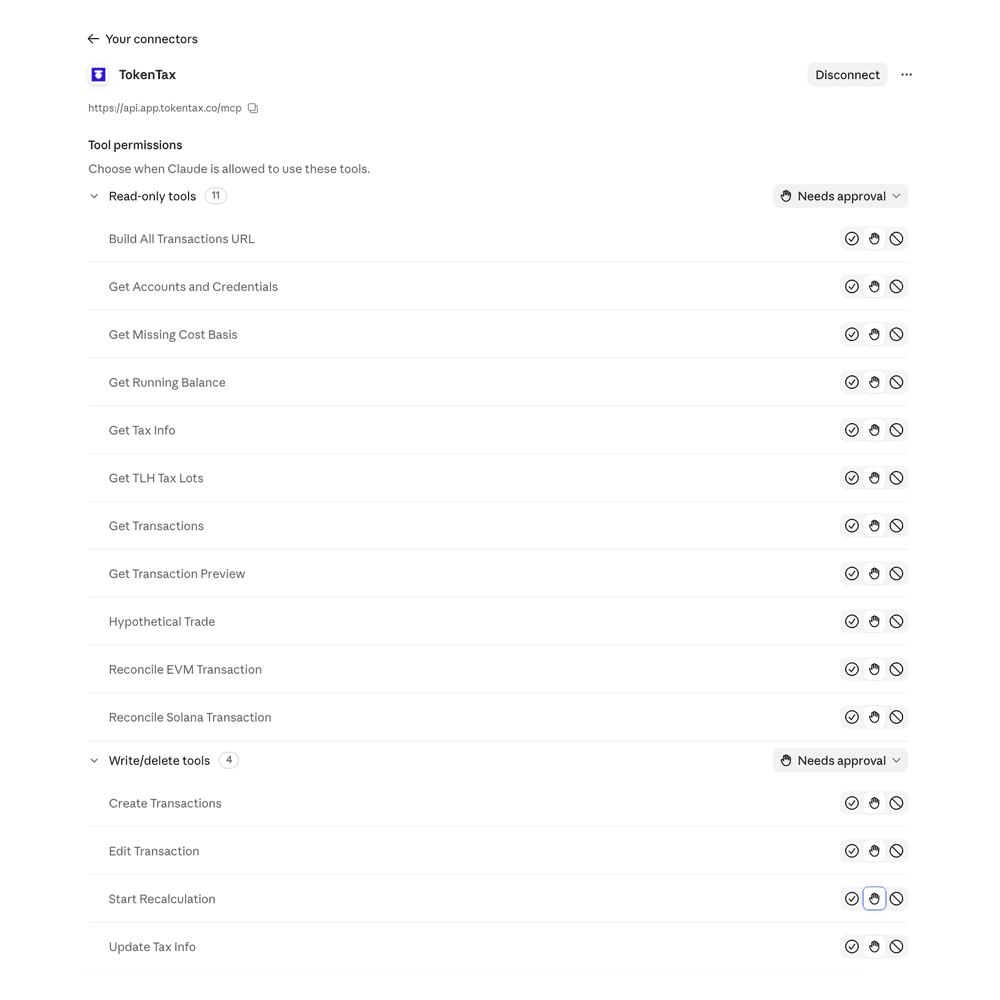
When you authorize the connection, TokenTax asks to read your tax and transaction data and to act on your behalf. Claude sorts TokenTax's 15 tools into 11 read-only tools and 4 write/delete tools: Create Transactions, Edit Transaction, Start Recalculation, and Update Tax Info. Acting on your behalf covers those four. TokenTax doesn't ask for its own confirmation before a change, so Claude's permission prompt is the only check.
Every TokenTax tool is set to Needs approval by default. Keep the write/delete tools on Needs approval, and block them before you use Research mode, which can call tools without asking. To change a setting, open TokenTax under Customize → Connectors and set each tool to Always allow, Needs approval, or Blocked.
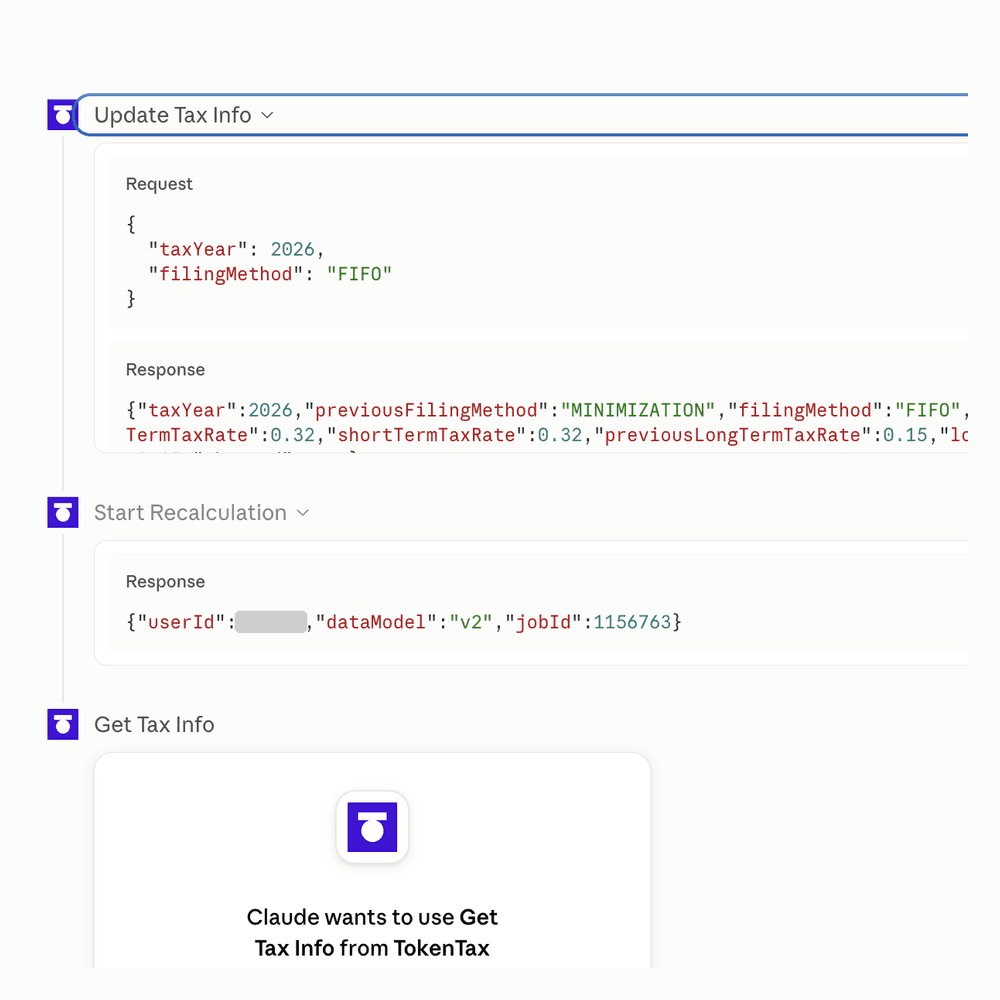
The permission prompt names the tool but doesn't show the details of a change, so read what Claude says it's about to do before you approve it. After a tool runs, click it in the conversation to see the request Claude sent and TokenTax's response. When Claude switched our test account's cost basis method, the response listed the previous method next to the new one.
Anthropic logs tool calls and responses with your chats, and it uses consumer chats for model training only if you opt in. See Claude's privacy policy.
To disconnect, open TokenTax under Customize → Connectors and click Disconnect. You can also remove Claude's access from TokenTax: open Profile, find Claude under MCP Integrations, and click Remove.
Troubleshooting TokenTax in Claude
I can't find the custom connector option in Claude
Look under Customize → Connectors, not Settings. Free accounts can have only one custom connector, so remove an existing one first. On Team and Enterprise plans, only an Owner can add TokenTax. Adding connectors on mobile is still in beta, so set it up on the web or in Claude Desktop.
Claude asks me to paste an API key
TokenTax doesn't use API keys. Remove the connector and add it again with Sign in now selected under Authentication. No sign-in is meant for servers that use an API key, so it won't connect to TokenTax.
I connected but see a paid-plan message
The TokenTax MCP server works only with paid TokenTax plans, and you need a plan for the current tax year to use every feature. Check your plan in TokenTax, and upgrade if you need to.
Claude says I don't have any transactions
Claude can only answer from data in your TokenTax account. If TokenTax has no transactions, there's nothing to calculate. Import your exchanges and wallets in TokenTax, run a recalculation, and ask again once it finishes.
Claude stops before finishing an answer
Claude needs your approval each time it uses a TokenTax tool. If you deny a request or don't respond, Claude answers with what it has and tells you what it couldn't get. Ask it to try again, and click Allow once when the request comes back.
TokenTax Claude integration FAQs
Can Claude do my crypto taxes?
Do I need a TokenTax API key to use Claude?
Does Claude need a paid plan to connect TokenTax?
Can Claude change or delete my TokenTax data?
Will Claude's answers match my TokenTax reports?
What other AI apps work with TokenTax?
To stay up to date on the latest, follow TokenTax on Twitter @tokentax.
