What Is Solscan?

 Expert verified
TokenTax content follows strict guidelines for editorial accuracy and integrity. We do not accept money from third party sites, so we can give you the most unbiased and accurate information possible.
Solscan is a free Solana blockchain explorer that lets you look up transactions, wallets, tokens, NFTs, programs, and other public activity.
You don’t need to connect your wallet, sign a message, or share a seed phrase to search public Solana data on Solscan.
Solscan is useful for checking what happened on-chain, but it doesn’t replace crypto tax software when you need cost basis, historical USD values, tax classifications, or filing-ready forms.

Why trust our crypto tax experts
Solscan is a free blockchain explorer for the Solana network. Think of it as a search engine for Solana. Paste in a wallet address, transaction signature, token mint, NFT, or program ID, and Solscan turns public blockchain data into pages you can read.
That’s useful when your Solana wallet doesn’t show enough detail. Maybe SOL hasn’t arrived yet. Maybe a swap failed. Maybe someone sent you a token that looks familiar, but you want to know whether it’s real. Solscan gives you a direct way to check the chain.
With Solscan, you can search for:
Wallet addresses
Transaction signatures
Token mints
NFTs
Program IDs
Crypto staking activity
DeFi interactions
What is Solscan and how does it work?
Solscan is a blockchain search tool for Solana. It takes public Solana data and turns it into readable pages for transactions, wallets, tokens, NFTs, programs, validators, and blocks.
Solana records a lot of activity. Every wallet transfer, token movement, swap, staking reward, NFT transfer, and program interaction leaves data behind. That data is public, but raw blockchain records can be hard to read.
Solscan makes that information easier to search. Here’s how it works:
Solana records the activity: A wallet sends SOL, swaps tokens, stakes SOL, buys an NFT, or interacts with a program.
Solscan reads the public data: It pulls the available on-chain details from Solana.
Solscan organizes the page: You can see wallet balances, transaction status, token transfers, fees, timestamps, and related accounts.
You verify what happened: Use the page to confirm whether a transaction succeeded, where funds moved, or which token mint was involved.
If you’re setting up a wallet before using Solscan, our guide to the best Solana wallets explains common options and what to consider.
What to search in Solscan
Search for a transaction signature when you want to see whether a transaction worked.
Search for a wallet address when you want to review SOL balances, token holdings, NFTs, staking activity, or past transactions.
Search for a token mint when you want to verify supply, holders, transfers, and related market data.
Search for a program ID when you want to inspect interactions with a Solana app, protocol, or smart contract.
Is Solscan safe and legit?
Yes. Solscan is safe to use as a read-only blockchain explorer. You don’t need to connect your wallet, approve a transaction, sign a message, or enter a seed phrase to search public Solana data.
Solscan is also a legitimate Solana explorer with clear institutional backing. Etherscan, the primary block explorer for Ethereum and one of the most widely trusted tools in crypto, acquired Solscan in 2024. That’s the strongest public credibility signal that Solscan is a serious, maintained product rather than a random community site.
Still, fake explorer sites exist. Crypto scammers often create spoofed domains that mimic legitimate tools. Use the official solscan.io website, especially when you’re checking a high-value transfer, reviewing a wallet with real funds, or gathering information for tax records.
Warning
A real block explorer (like Solscan or Etherscan) helps you read public blockchain data. It won’t ask for your seed phrase, private key, wallet password, or recovery phrase. Never enter those details into any explorer.
What are the pros and cons of Solscan?
This table shows the main advantages and limitations of Solscan.
Pros | Cons |
Free for normal Solana blockchain searches | Some transaction pages can feel crowded for beginners |
No wallet connection needed for public lookups | It only covers Solana |
Useful for wallet, transaction, token, NFT, and program searches | Token symbols can be copied or misleading |
Helpful for checking failed or pending transactions | It doesn’t classify transactions for tax reporting |
Strong token holder, transfer, and mint pages | Historical USD pricing can be incomplete or unreliable for tax use |
Useful labels and name tags for known addresses | Unknown addresses may still require manual review |
API and analytics tools are available for advanced users | API access may require a paid plan, depending on usage |
Pro tip
For most Solana users, Solscan is a good tool to bookmark and use to learn about blockchain and gather information. It’s less useful when you need tax classifications, historical prices, or a finished tax report. That’s where our crypto tax software helps.
Advanced features of Solscan
The search bar in Solscan is just the beginning. The deeper pages are where Solscan becomes even more useful.
Token pages are a good example. A ticker symbol isn’t enough. Anyone can create a token with a familiar symbol, so the mint address matters more than the name. Solscan lets you check the mint, supply, holders, transfers, and official links before you trust what you’re seeing.
Example
A token claims major adoption, but the holder page shows that most of the supply sits in a few large wallets. That doesn’t automatically make the token a scam, but it’s useful risk information. You may want to compare holder count, whale concentration, token age, DEX liquidity, and transfer history before trading.
Wallet pages are useful for a different reason. In an active Solana wallet, you might see:
Swaps
Staking rewards
Dust tokens
NFTs
Failed transactions
DeFi activity
Interactions with known programs
Solscan also includes program pages, labels, name tags, analytics dashboards, and API access. Labels can be especially helpful. If an address belongs to a known exchange, project, program, or protocol, a label can save you from guessing.
If you’re reviewing staking activity, our guide to Solana staking explains how staking works, while our crypto staking taxes guide explains how rewards are typically reported.
Who is Solscan made for?
Solscan is for anyone who needs to check Solana activity directly.
Beginners: Confirm whether SOL arrived, a transaction succeeded, or a wallet address is active.
Traders: Review token mints, holder concentration, transfers, DEX activity, and wallet movement.
NFT collectors: Check ownership history, collection details, metadata, and recent transfers. For tax context, see our NFT tax guide.
Developers: Debug program interactions, failed transactions, logs, and account activity.
Taxpayers: Find timestamps, fees, transaction signatures, wallet trails, and transfer history.
Crypto accountants: Review Solana activity across wallets, DeFi protocols, NFTs, and exchanges.
How to use Solscan
Here’s a quick rundown of how to use Solscan, broken into simple steps.
How to view a wallet on Solscan

1. Copy your public address from a Solana wallet (e.g., Phantom) and paste the address into Solscan’s search bar. You will use this search bar frequently to look at activity and projects on the Solana blockchain, so become familiar with it.
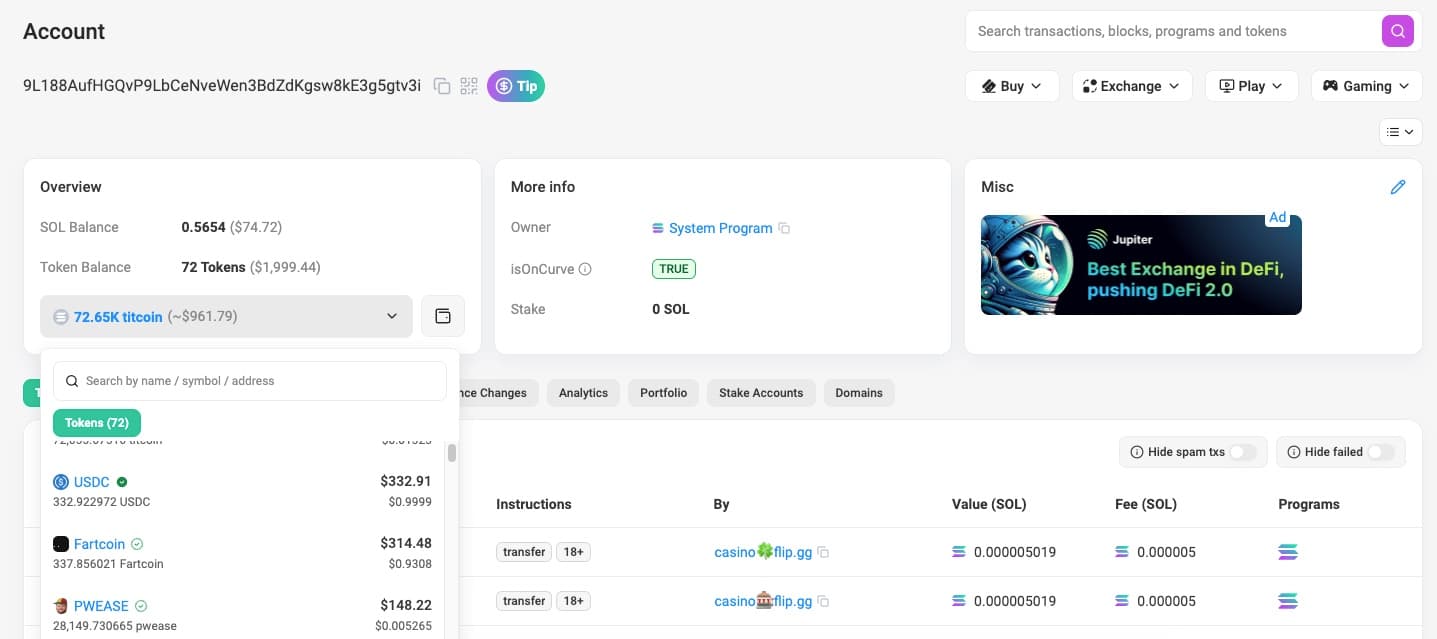
2. Review the wallet’s summary banner for total SOL and token balances.
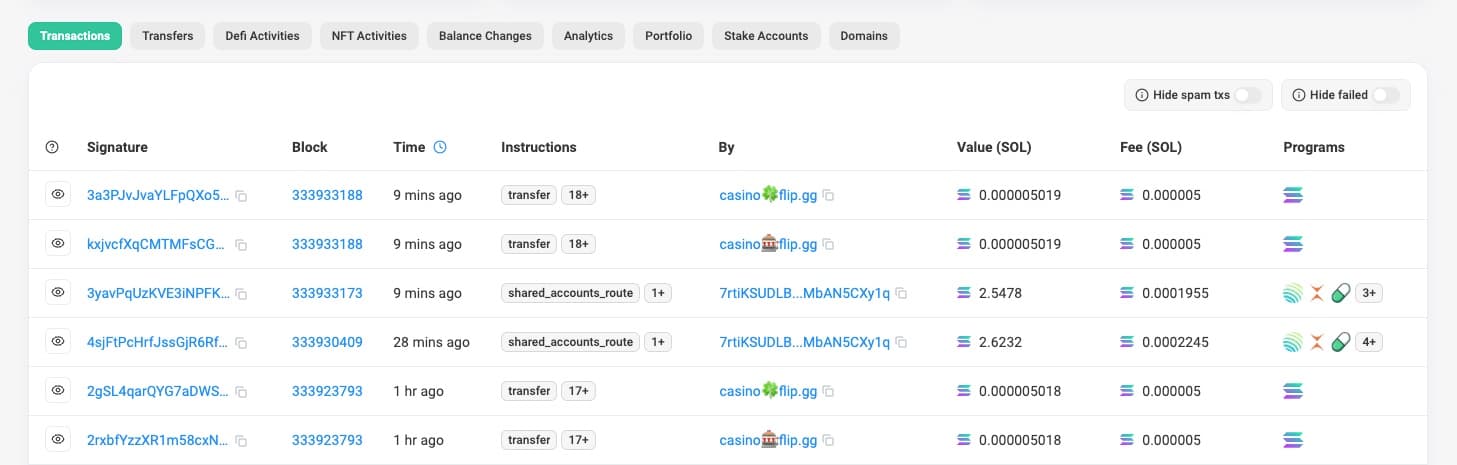
3. Scroll down to see transactions, SPL tokens, NFTs, and stakes.
How to check a transaction on Solscan
1. Copy the transaction signature from your wallet or exchange and paste it into the Solscan search bar (same as above).
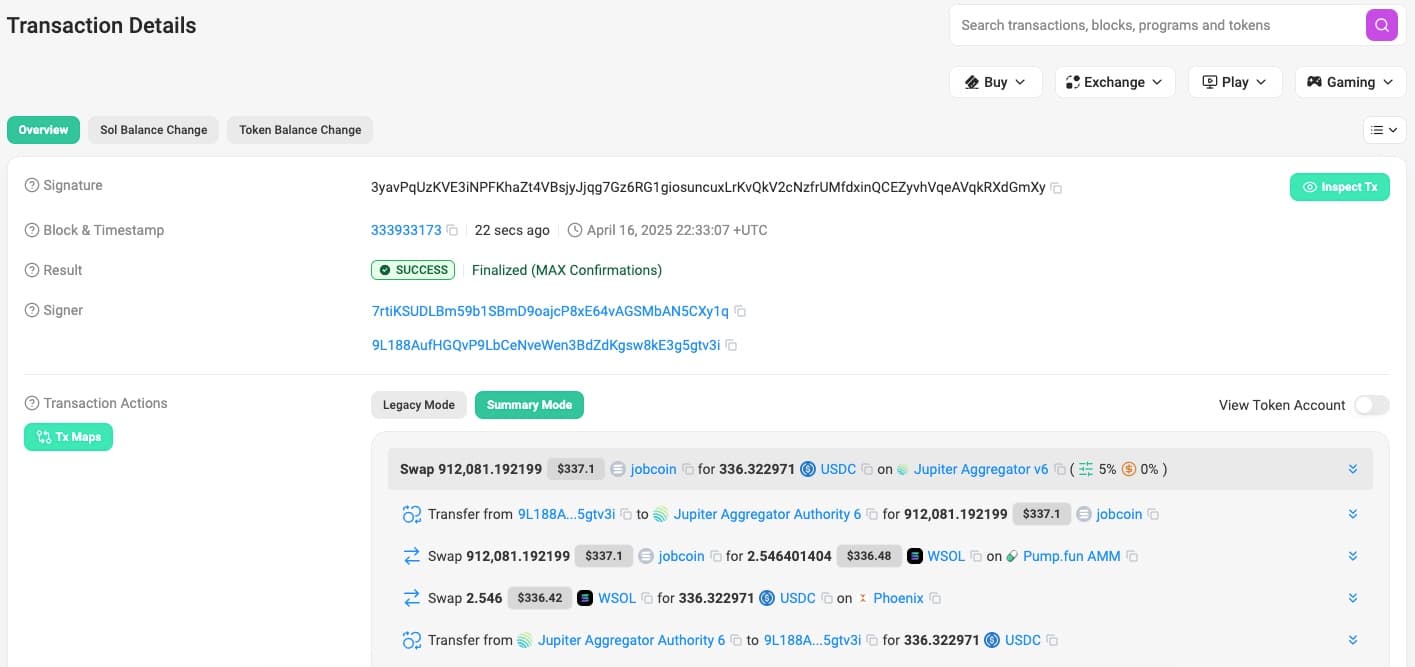
2. Confirm the green Success status or view any error message. Easily inspect fees and balances for the accounts involved.
How to look up token information
Enter the token mint address or ticker symbol in the search bar (same as above).
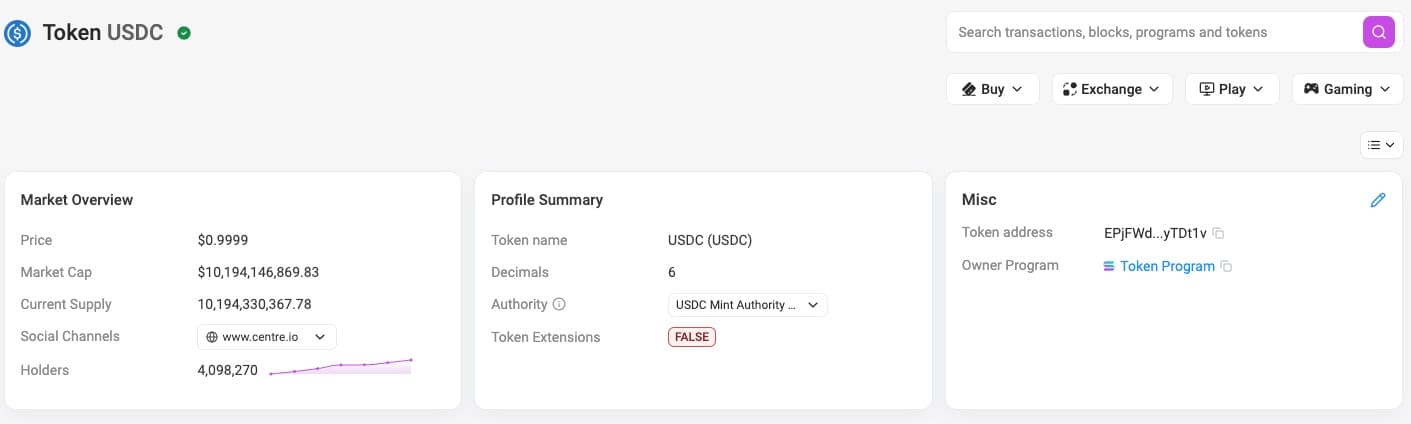
2. Review price, market cap, and supply metrics on the token page.
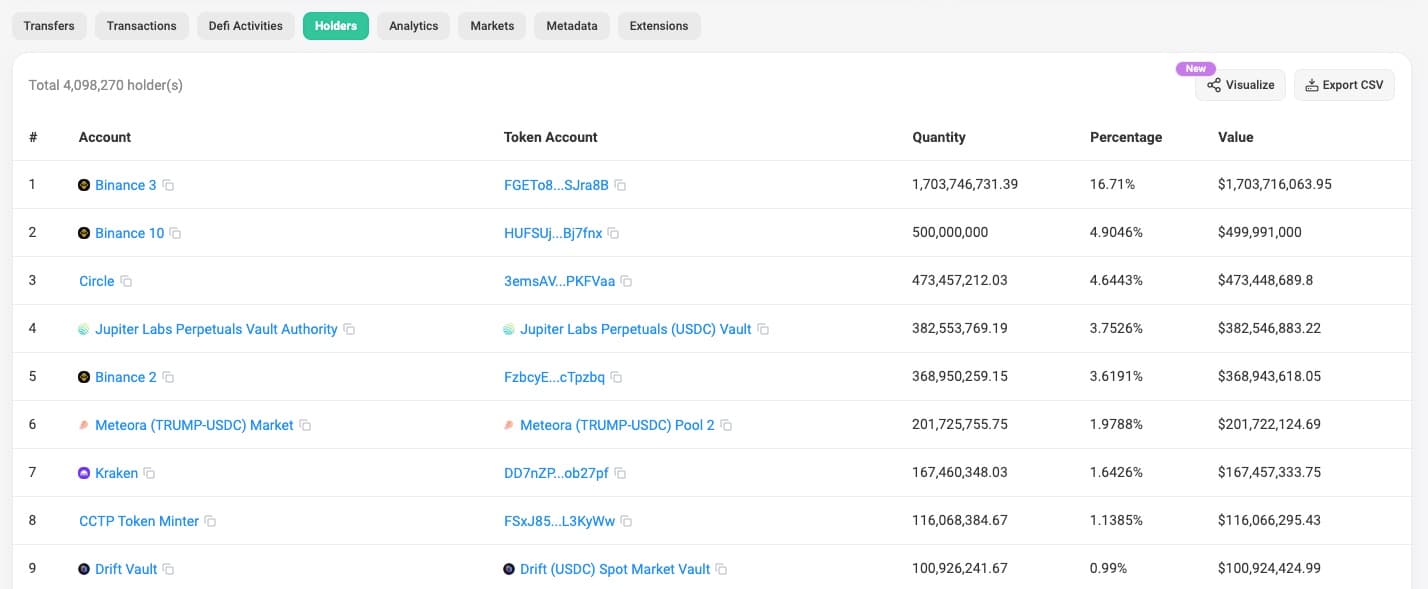
3. Open Holders to see the distribution and major wallets.
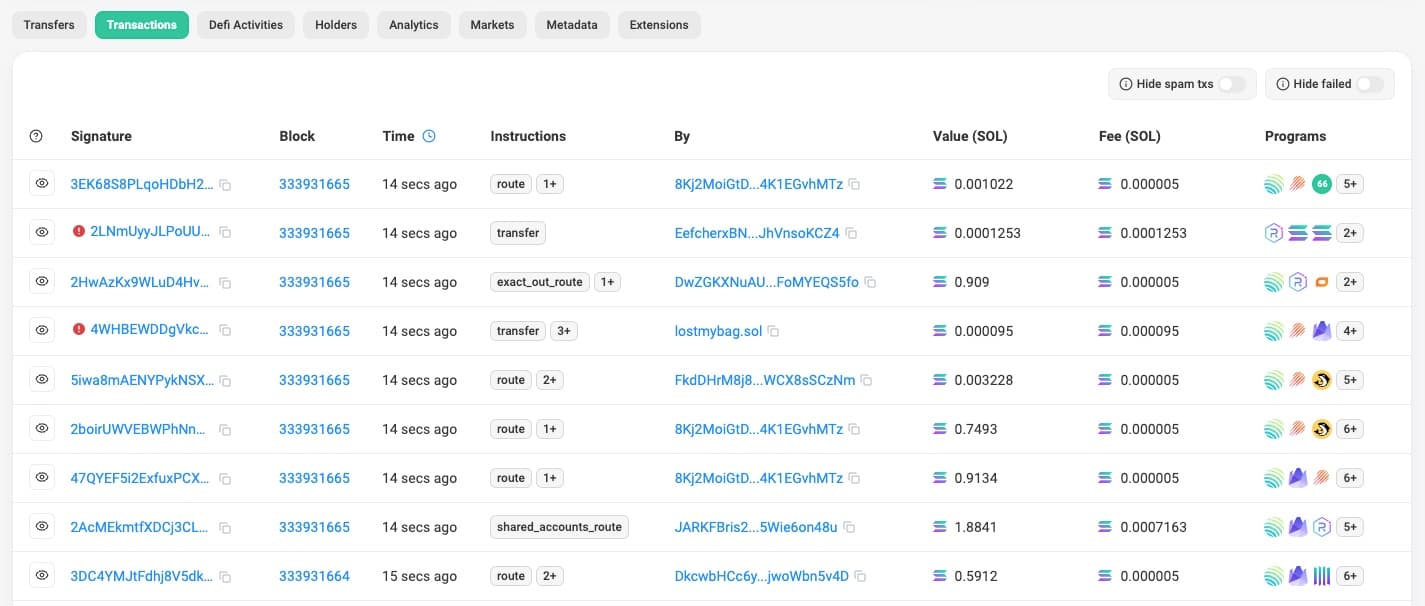
4. Use Transactions to monitor large transfers or DEX volume.
How to research NFTs on Solscan
1. Search for a collection name or a specific mint address in the search bar (same as above).
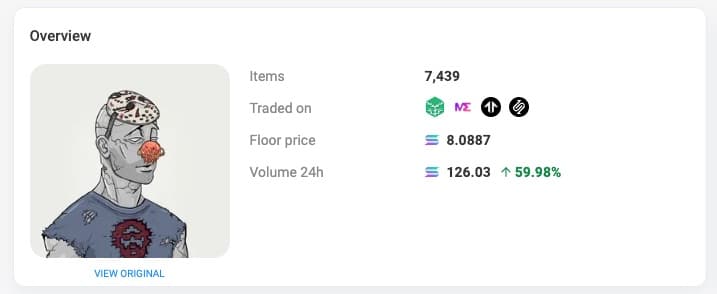
2. View floor price, total volume, and recent sales on the collection page.
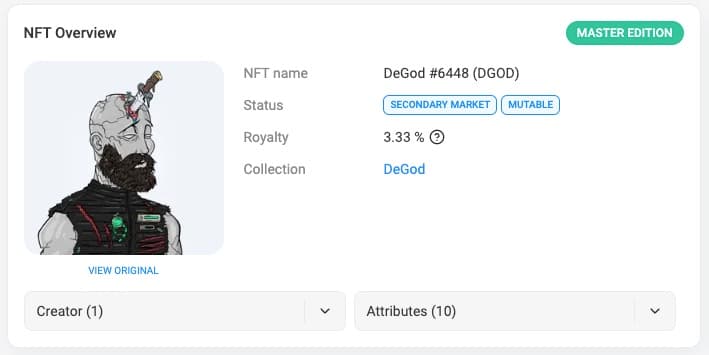
3. Open an individual NFT to inspect ownership history and metadata.
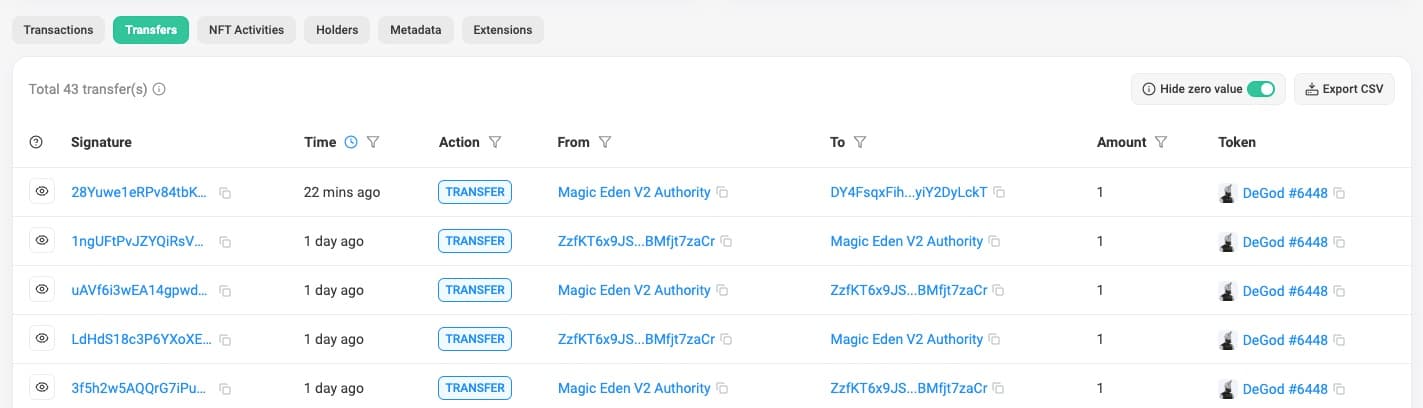
4. Track transfers for provenance or rarity analysis.
How to use Solscan for token deep dives
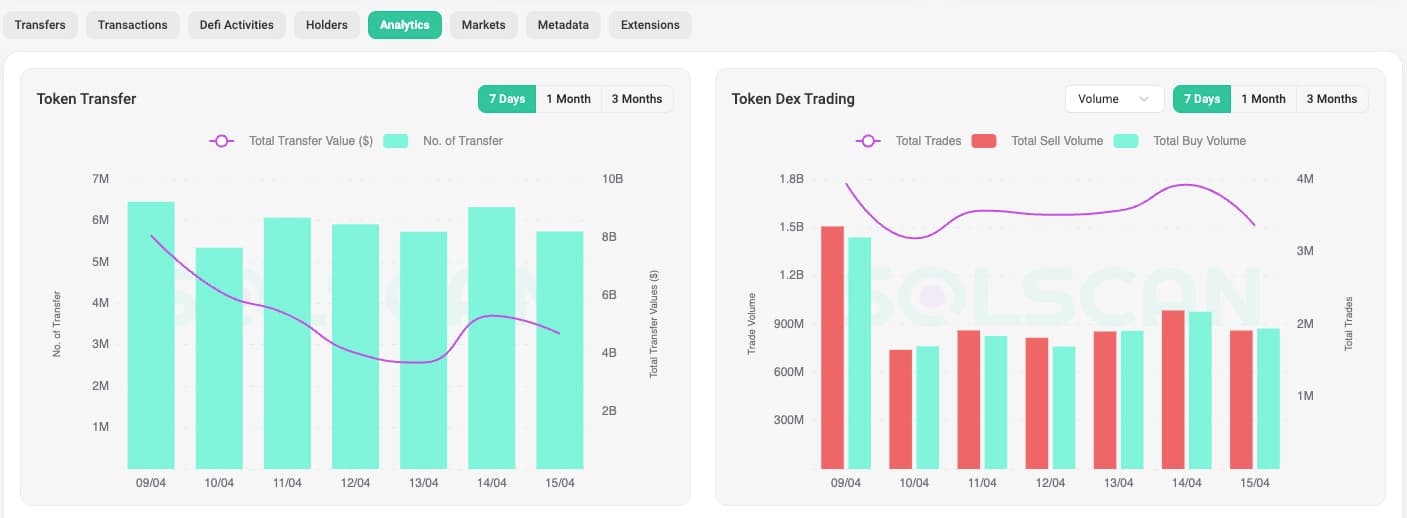
1. Open the token page and select Analytics. There you’ll be able to review daily active addresses, transaction counts, and velocity.

2. Export CSV data for custom spreadsheet or Python analysis with the Transfers and/or Token/Holders tab.
Solscan and crypto tax
Solscan can help at tax time because it shows available on-chain activity for a Solana wallet. It’s useful for checking transaction signatures, timestamps, wallet addresses, SOL fees, token transfers, NFT transfers, staking activity, failed transactions, and DeFi interactions.
A Solscan page might show SOL moving between wallets. That movement could be a self-transfer, payment, sale, swap, bridge, staking action, or part of a DeFi transaction. Solscan can show the activity, but it won’t always tell you the tax classification.
The IRS says digital asset transactions may need to be reported, and sales, exchanges, or other dispositions can create capital gains or losses. Income from digital assets can also be taxable.
For tax reporting, you need fair market value in USD at the specific time of each taxable event. A rough chart price or the closest available token price may not be enough to establish your crypto cost basis, so it’s important to track your trades.
Use Solscan to confirm:
Transaction signatures
Wallet addresses
Timestamps
SOL fees
Token and NFT transfers
Staking activity
Failed transactions
DeFi interactions
Program interactions
Counterparty wallets
Then use our crypto tax software to classify the activity, fill pricing gaps, calculate gains and losses, and generate tax forms. For more Solana-specific tax reporting details, see our Solana tax guide. For filing mechanics, see our Form 8949 crypto guide, crypto tax forms guide, and guide to how to report crypto on your taxes.
Pro tip
If you’re trying to decide whether a wallet movement is taxable, our guide to transferring crypto between wallets explains why self-transfers usually aren’t taxed, while sales, swaps, and spending can be.
Why Solscan matters for Solana users
Solscan matters because wallets and exchanges don’t always show enough detail. A blockchain explorer gives you a second way to verify what happened.
Solscan helps Solana users:
Confirm activity outside a wallet app: Wallet interfaces can lag, hide details, or summarize transactions too aggressively.
Verify the real token: Token symbols can be copied. Mint addresses are harder to fake.
Check transaction status: A failed transaction can still appear on-chain and still charge a small fee.
Review wallet history: Transfers, swaps, staking, NFTs, and DeFi actions can appear in one place.
Trace unexpected assets: Dust tokens, suspicious NFTs, and unknown transfers can be reviewed before you interact.
Support tax records: Solscan can help verify signatures, timestamps, fees, and wallet trails.
Research before trading: Holder distribution, transfer patterns, liquidity clues, and token age can help you avoid obvious red flags.
Solscan vs other blockchain explorers
This table shows how Solscan compares with other Solana blockchain explorers.
Feature | Solscan | Official Solana Explorer | Solana.FM | Xray by Helius |
Best for | Most Solana users | Basic checks and developer context | Detailed transaction views | Visual wallet and transaction analysis |
Beginner-friendly | High | Moderate | Moderate | High |
Wallet lookup | Yes | Yes | Yes | Yes |
Transaction lookup | Yes | Yes | Yes | Yes |
Token pages | Strong | Basic | Strong | Moderate |
NFT support | Yes | Limited | Yes | Limited |
Labels and tags | Strong | Limited | Strong | Strong |
Developer detail | Strong | Strong | Strong | Strong |
Tax record support | Helpful for verification | Basic | Helpful for verification | Helpful for tracing |
Verdict
Solscan is usually the easiest place for beginners to start. Traders may use Solscan, Solana.FM, Birdeye, or Xray depending on whether they’re checking wallets, token markets, or fund flows. Developers may prefer the official Solana Explorer or Solana.FM when they need lower-level transaction and program details.
Common Solscan mistakes: How to avoid them
Searching for an exchange order ID instead of a transaction signature: They aren’t the same thing. If you’re trying to find an on-chain transfer, look for the transaction signature or hash from your wallet or exchange withdrawal page.
Trusting a ticker by itself: Token symbols can be copied. Verify the mint address before you trust a token page.
Ignoring UTC timestamps: Confirm the timestamp timezone before using Solscan records for taxes, especially near year-end.
Assuming a failed transaction disappeared: A Solana transaction can fail, still appear on-chain, and still incur a small fee.
Treating every wallet movement as a sale: Moving crypto between two wallets you own is not the same as selling, even if the activity looks busy.
Relying on Solscan for full tax pricing: Solscan can help verify on-chain facts, but it may not provide complete historical USD pricing for every token, NFT, or DeFi transaction.
Searching the wrong network: Solscan is for Solana. If you’re looking for an Ethereum, Base, Polygon, Bitcoin, or BNB Smart Chain transaction, use the correct explorer.
Assuming no result means no transaction: The transaction may still be processing, the signature may be wrong, the wallet may be on another network, or a new token may not have complete indexed data yet.
If Solscan shows an unexpected result, start with the basics. Check the wallet address, transaction signature, network, token mint, and transaction status. Then compare what you see against your wallet history.
Pro tip
See our expert DeFi tax guide for a deep-dive into advanced DeFi tax implications.
Solscan alternatives
Official Solana Explorer: Good for basic Solana network checks, validator context, and developer-oriented transaction details.
Solana.FM: Good for detailed transaction views, labels, account activity, and deeper transaction review.
Xray by Helius: Good for visual wallet tracing and understanding fund flows across addresses.
Birdeye: Good for token charts, price action, liquidity, and DEX market data.
Solana Beach: Good for users who want another explorer interface and network-level data.
Most beginners can start with Solscan. If a transaction is complicated, a token looks suspicious, or you’re researching DeFi activity in detail, a second explorer can help confirm what you’re seeing. When in doubt, speak to one of our crypto tax specialists.
What is Solscan FAQs
Is Solscan free and safe to use?
Can you track specific token transactions on Solscan?
Do I need a wallet to use Solscan?
How do I know if a transaction was successful on Solscan?
Can I track DeFi activity on Solscan?
Does Solscan show historical USD prices for transactions?
To stay up to date on the latest, follow TokenTax on Twitter @tokentax.
Related Content
